Unable to add ProjectUser on Workfront via Fusion | Community
Skip to main content
Level 2
February 16, 2026
Solved

Unable to add ProjectUser on Workfront via Fusion

  • February 16, 2026
  • 2 replies
  • 32 views

Hello Everyone, 

I would like to add a team / user on Workfront project (i.e. people section of the WF project).
I tried the beloew 


  1. Custom API module 
    URI : prjusr
    Method : Post 
    Query String : ProjectID & UserID

    Error : Invalid Json at line 1 (If the parameters are passed in the Body section)
    -OR-
    null objCode (when the parameters were passed as Query Strings)

     
  2. Create Record
    Record type : Project User
    Passed both fields : Project ID & User ID 

    Error : PRTU is not a top level object 
Best answer by RonnySu

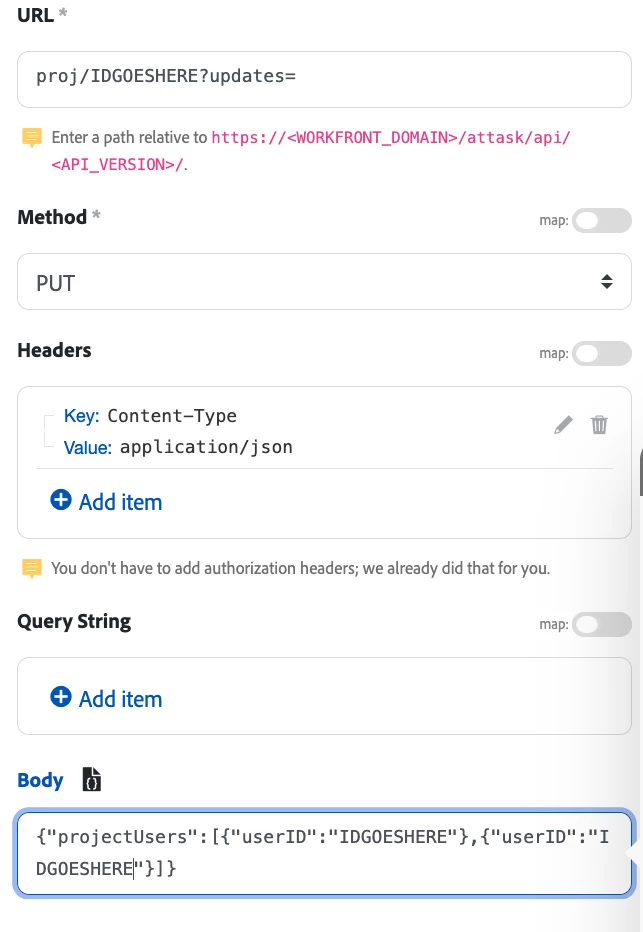
Hi ​@harishdev,  It’s a bit of a tricky api call.   but,  Here’s my call:


In the URL field (without quotes) add “proj/IDGOESHERE?updates=”


Body: {"projectUsers":[{"userID":"IDGOESHERE"},{"userID":"IDGOESHERE"}]}


2 replies

RonnySuAdobe EmployeeAccepted solution
Adobe Employee
February 16, 2026

Hi ​@harishdev,  It’s a bit of a tricky api call.   but,  Here’s my call:


In the URL field (without quotes) add “proj/IDGOESHERE?updates=”


Body: {"projectUsers":[{"userID":"IDGOESHERE"},{"userID":"IDGOESHERE"}]}


Vishal_Anand
Level 5
February 16, 2026

@harishdev  Use the Project User API (prjusr). Don’t pass an objCode—POST projectID and userID to the prjusr endpoint with proper JSON or form-encoded body and include your apiKey or sessionID.


Example (JSON, curl) curl -X POST "https://<company>.my.workfront.com/attask/api/v9.0/prjusr?apiKey=<APIKEY>"
-H "Content-Type: application/json"
-d '{"projectID":"<PROJECT_ID>","userID":"<USER_ID>"}'
 

Example (form-encoded, curl) curl -X POST "https://<company>.my.workfront.com/attask/api/v9.0/prjusr?apiKey=<APIKEY>"
-H "Content-Type: application/x-www-form-urlencoded"
--data "projectID=<PROJECT_ID>&userID=<USER_ID>"


Notes / common fixes:

  • Error “Invalid JSON at line 1” means your request body wasn’t valid JSON; use a JSON object or use form-encoded data and set the correct Content-Type header.
  • Error “null objCode / PRTU is not a top level object” means you supplied the wrong object code or payload structure. The endpoint is prjusr (no objCode needed). Don’t set objCode in the body.
  • Make sure the user ID and project ID exist and you have permission to add team members.
  • If you need to set role or billing, include extra fields (roleID or isPM etc.) — check your Workfront schema for allowed prjusr fields.
  • If using a connector (Zapier/Workato/etc.), pick the “Project User” object or set the object code to prjusr (not PRTU).