
KierstenKollins
Adobe Champion, Community Advisor, UG Leader
Oct 14, 2024 6:52 PM UTC
Solved

Retaining "Text with Formatting" field formatting in Email module

Has anyone managed to keep the formatting (like bullets and numbers) from a “text with formatting” field when it’s transferred into the body of an email module?


I am returning the below when the email has been sent. I am using the HTML content type option.
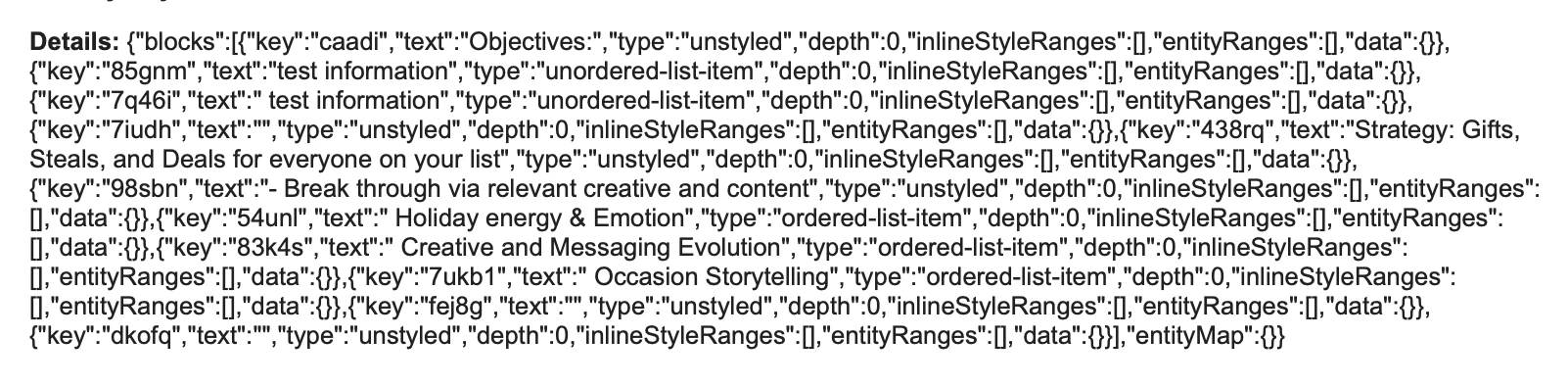


Our team wants to bullet or number key information and ensure that this formatting is preserved when it appears in the email.
This post is no longer active and is closed to new replies. Need help? Start a new post to ask your question.
KierstenKollins
KierstenKollinsAccepted solution
Adobe Champion, Community Advisor, UG Leader
Oct 15, 2024 1:05 PM UTC

Throwing out a workaround for others that may need formatting in their email.


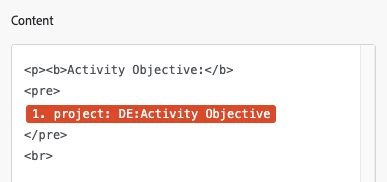
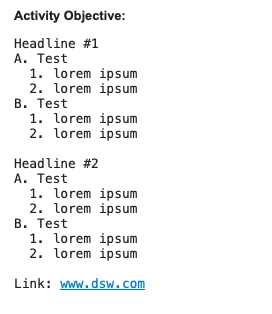
I reverted back to using a paragraph field. Within the email module content area, I used the <pre></pre> html tags around the field to be able to retain formatting from the paragraph field.


After doing a few quick tests, numbering and lettering seems to be the cleanest and most organized compared to copied and pasted in bullets.


5 replies

Sven-atClient
Level 3
Oct 14, 2024 7:19 PM UTC

@kierstenkollins 
you'll need to find out what the email module accepts as format. I'm almost certain it's not the JSON from the RTF field. 

Translate
Doug_Den_Hoed_AtAppStore
Community Advisor
Community Advisor
Oct 14, 2024 7:28 PM UTC


Ehm...breaking it to you gently @kierstenkollins,


The GOOD: We hit a similar request a couple of years ago when we added the ability to interpret the "block" format shown above and honor it as intended (i.e. with bullets, italics, etc.) in our Magic Reports solutions, but


The BAD: Although well structured, the block format did not appear (at least last at that time) to have any translation libraries available (at all...let alone Fusion specific), so


The UGLY: we wrote our own, as I'd expect you'd need to do, too


Regards,

Doug 

Translate
Learn more at www.atappstore.com, email doug.denhoed@atappstore.com, or tag me here @Doug_Den_Hoed_AtAppStore.
KierstenKollins
Adobe Champion, Community Advisor, UG Leader
Oct 14, 2024 7:31 PM UTC

Darn it. Thanks @doug_den_hoed__atappstore! 

Translate
KierstenKollins
Adobe Champion, Community Advisor, UG Leader
KierstenKollinsAdobe Champion, Community Advisor, UG LeaderAuthorAccepted solution
Adobe Champion, Community Advisor, UG Leader
Oct 15, 2024 1:05 PM UTC

Throwing out a workaround for others that may need formatting in their email.


I reverted back to using a paragraph field. Within the email module content area, I used the <pre></pre> html tags around the field to be able to retain formatting from the paragraph field.


After doing a few quick tests, numbering and lettering seems to be the cleanest and most organized compared to copied and pasted in bullets.


Translate
Doug_Den_Hoed_AtAppStore
Community Advisor
Community Advisor
Oct 15, 2024 1:45 PM UTC


Inspired, @kierstenkollins!


I'm pleased you found an adequate workaround.


Regards,

Doug

Translate
Learn more at www.atappstore.com, email doug.denhoed@atappstore.com, or tag me here @Doug_Den_Hoed_AtAppStore.