Nested IF/OR Field Mapping in Fusion Module | Community
Skip to main content
Level 9
March 2, 2023
Solved

Nested IF/OR Field Mapping in Fusion Module

  • March 2, 2023
  • 1 reply
  • 1011 views

Hi Fusion Community,


I have an update module with a field mapping where I want to create an OR statement with two IF's.
I have it set up as such, thus far:


Raw text

{{if((268.`DE:Last Month’s Revenue to be Recognized` + 239.`DE:Total Revenue Recognized To Date`) - 477.`DE:Total Committed Price_Asset` > 0; 0; 268.`DE:Last Month’s Revenue to be Recognized`) | if((268.`DE:Last Month’s Revenue to be Recognized` + 239.`DE:Total Revenue Recognized To Date`) - 477.`DE:Total Committed Price_Asset` < 0 & 1.`DE:Program Status` = "Completed"; 0; 268.`DE:Last Month’s Revenue to be Recognized`)}}


Screen shot of module field mapping
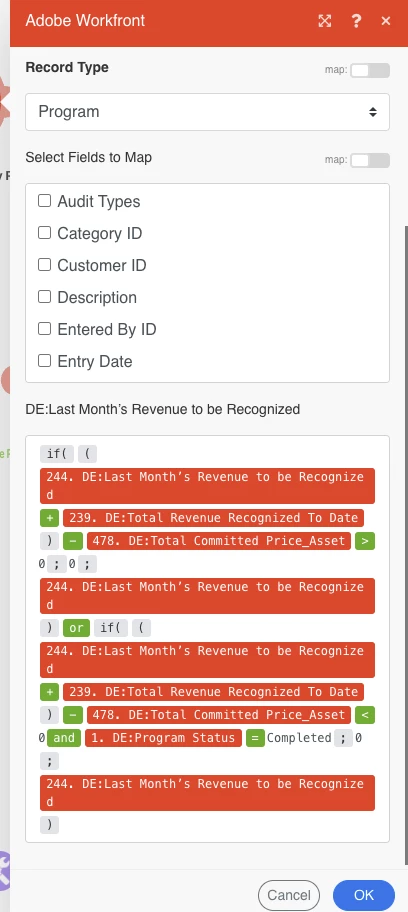
 

This OR expression doesn't seem to be working.  Maybe because the OR is an expression?

Anyone have any idea how I can make this an OR statement?
Thanks,
Nick



This post is no longer active and is closed to new replies. Need help? Start a new post to ask your question.
Best answer by ChrisStephens

Correct, an if statement is limited to a single option for true and a single option for false. What you described would work, and would probably be the easiest/most readable method. Or if you could nest them that could work, like you could do IF({test 1}; {true action}; IF({test 2}; {true action}; IF(....... .

Or if your action depends on the true/false arrangement, you can make a switch statement for any of the arrangements that you need, with it serving a different JSON string based on the true/false-s and passing that to a WF Custom API call.

1 reply

ChrisStephens
Community Advisor
Community Advisor
March 3, 2023

If I recall correctly, the OR should be inside of your truthy test, so it should look something like if({test condition 1}OR{test condition 2};{result if ture};{result if false}).


Personally when I make conditions like that, I will create a set variable module right before it, and make each condition check a unique variable, and then just use the resulting true/false in the final mapping. So for example, prior to this Workfront module, I would have Test 1 Variable be your first evaluation, then Test 2 Variable be your second evaluation, and then in the Workfront module it would just be if({Test 1 Variable}OR{Test 2 Variable};{true result};{false result}). Doing it this way makes it much easier to see what the code is doing, as well as making debugging easier.

NickVa7Author
Level 9
March 3, 2023

Thanks, Chris!  The set variable idea makes good sense.  I'm implementing that.


On my update program module right after that, where I put the IF in the field mapping, what if I have more than 1 true and more than 1 false results that I want to populate?  A single IF statement seems to limit me to just 1 true result and 2 false result.


Right now I have 4 different variables being set, each will need to populate a different result in the field mapping if true.  Can I accomplish that with just one module/one IF, or do I need to set up a router after the variable, and create filters for each of the 4 different variables being true, and then 4 update program modules to populate the correct value?

ChrisStephens
Community Advisor
ChrisStephensCommunity AdvisorAccepted solution
Community Advisor
March 3, 2023

Correct, an if statement is limited to a single option for true and a single option for false. What you described would work, and would probably be the easiest/most readable method. Or if you could nest them that could work, like you could do IF({test 1}; {true action}; IF({test 2}; {true action}; IF(....... .

Or if your action depends on the true/false arrangement, you can make a switch statement for any of the arrangements that you need, with it serving a different JSON string based on the true/false-s and passing that to a WF Custom API call.