How to restrict all special characters in “Project Name” field on request form? | Community
Skip to main content
Level 2
June 13, 2025
Solved

How to restrict all special characters in “Project Name” field on request form?

  • June 13, 2025
  • 1 reply
  • 520 views

We’re currently using validation logic in Workfront to block certain special characters in the Project Name field on a request form. However, maintaining a list of every disallowed character is not scalable, and users are still finding creative ways to enter unintended characters.

We’re looking for a solution to restrict all special characters, ideally using a broader pattern or rule, rather than validating each one manually.

Has anyone implemented a global validation (maybe through Fusion, custom API, or smarter field logic) that restricts project names to only letters, numbers, spaces, and maybe a few approved symbols (e.g. dashes or underscores)?

Any guidance or example logic would be super helpful.
This post is no longer active and is closed to new replies. Need help? Start a new post to ask your question.
Best answer by KellieGardner

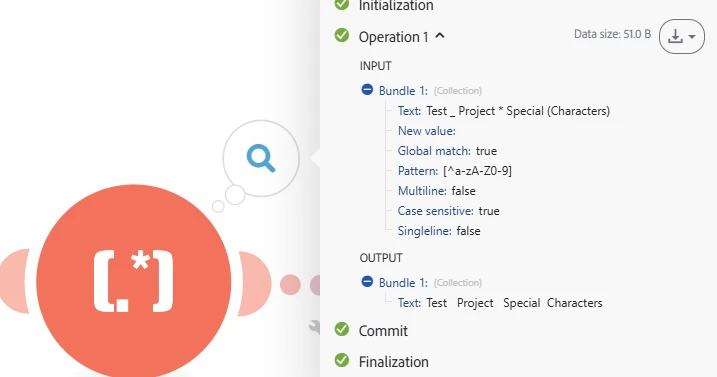
You could use fusion to remove special characters when they are used. You can use the Text Parser - Replace to do it


https://experienceleague.adobe.com/en/docs/workfront-fusion/using/references/apps-and-their-modules/tools-and-transformers/text-parser#match-pattern


1 reply

KellieGardner
Community Advisor
KellieGardnerCommunity AdvisorAccepted solution
Community Advisor
June 13, 2025

You could use fusion to remove special characters when they are used. You can use the Text Parser - Replace to do it


https://experienceleague.adobe.com/en/docs/workfront-fusion/using/references/apps-and-their-modules/tools-and-transformers/text-parser#match-pattern