Fusion Date functions: locate objects updated within last 2 days | Community
Skip to main content
Level 4
January 9, 2024
Solved

Fusion Date functions: locate objects updated within last 2 days

  • January 9, 2024
  • 3 replies
  • 895 views

Hi. What would be the syntax in Fusion when I want to retrieve and object only if it was last updated within the last 48 hours or 2 days: 
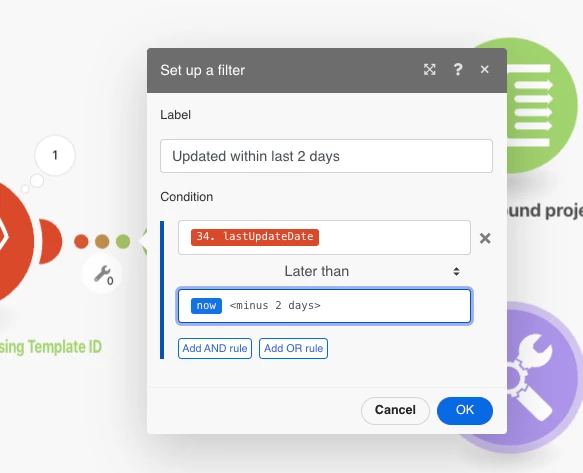


Sorry if this is documented elsewhere, but I couldn't locate this detail in my Searches. 



This post is no longer active and is closed to new replies. Need help? Start a new post to ask your question.
Best answer by KellieGardner

you would want to do add days and then use a negative number to go back 2 days. 


addDays({now};-2)


There is some documentation here on functions in fusion


https://experienceleague.adobe.com/docs/workfront/using/adobe-workfront-fusion/functions-in-fusion/date-and-time-functions.html?lang=en

3 replies

Mylah_DAuthor
Level 4
January 9, 2024

I think I found the solution on this thread: https://experienceleaguecommunities.adobe.com/t5/workfront-fusion-2-0-questions/wildcard-date-filters-in-fusion/td-p/491963


Does this look right?: 

Thanks in advance for your help. 

KellieGardner
Community Advisor and Adobe Champion
KellieGardnerCommunity Advisor and Adobe ChampionAccepted solution
Community Advisor and Adobe Champion
January 9, 2024

you would want to do add days and then use a negative number to go back 2 days. 


addDays({now};-2)


There is some documentation here on functions in fusion


https://experienceleague.adobe.com/docs/workfront/using/adobe-workfront-fusion/functions-in-fusion/date-and-time-functions.html?lang=en

ChrisStephens
Community Advisor
Community Advisor
January 10, 2024

Instead of doing it in a filter, you could just add it as a parameter to your query, to the effect of


lastUpdateDate = {today -2}

lastUpdateDate_Mod = gt