Finding an approvalID on an issue: Why is this so hard? | Community
Skip to main content
JohnJOSullivan
Level 6
February 6, 2026
Solved

Finding an approvalID on an issue: Why is this so hard?

  • February 6, 2026
  • 1 reply
  • 44 views

Grok and I have been trying to crack this nut for an hour now. (I asked the AI Assistant and….let’s just say there were many 👎🏻s) Figured I’d ask the hive mind and--if I figure it out before anyone else does--I’ll post it here for everyone else.

The ask: I want to be able to determine the ID of an approval attached to an issue. The only pieces of data I have are the approvalProcessID (which I know because I have Fusion apply an approval process to these issues) and currentApprovalStepID. 

No matter what I do with that currentApprovalStepID, I just cannot get to the approval. If I try to use that to search for the APPROVAL object, I get a 400. If I try searching via the ARVSTP object, I get scolded that it’s “...not a top level object and can't be requested directly in internal”

There has to be something that both Grok and I are missing here. Any thoughts?

Best answer by IvanBebek-iX

Hi ​@JohnJOSullivan,


Sometimes when we hit the head on the wall we have two options either keep going with bigger tools (you including AI to help you → equivalent to renting an excavator) or just finding a way around the wall if it is not an unavoidable obstacle.  


I had the same a problem as you, and after depleting option 1, I went with option two. I have decided to search for all approvals which had relation to specific issues rather than getting approvals from an issue.


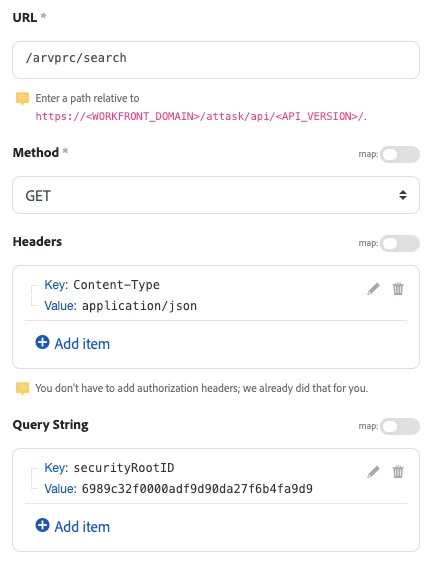
Here is a screenshot how you can do it
 

As you can see you can search for approvals and then check to which root object is it connected to with field securityRootID you can also confirm if it is attached to OPTASK with securityRootObjCode but this is redundant in my opinion.


Hopefully this helps. If you have any questions please reach back.


Best regards,
Ivan

1 reply

IvanBebek-iX
IvanBebek-iXAccepted solution
Level 5
February 9, 2026

Hi ​@JohnJOSullivan,


Sometimes when we hit the head on the wall we have two options either keep going with bigger tools (you including AI to help you → equivalent to renting an excavator) or just finding a way around the wall if it is not an unavoidable obstacle.  


I had the same a problem as you, and after depleting option 1, I went with option two. I have decided to search for all approvals which had relation to specific issues rather than getting approvals from an issue.


Here is a screenshot how you can do it
 

As you can see you can search for approvals and then check to which root object is it connected to with field securityRootID you can also confirm if it is attached to OPTASK with securityRootObjCode but this is redundant in my opinion.


Hopefully this helps. If you have any questions please reach back.


Best regards,
Ivan

JohnJOSullivan
Level 6
February 9, 2026

Very interesting, thank you for sharing this!

I ended up doing Option #2--found a sneaky way around the need to identify the approvalID via automation. Even so, I can see the need for approvalIDs in the future so glad to have something to play with.


Thanks again!

JohnJOSullivan
Level 6
February 11, 2026

Well there it is!


This is exactly what I was looking for. THANK YOU!

-j