Level 9
Nov 22, 2023 10:02 PM UTC
Question

Export Output Bundles


Hi Fusion Community,


Does anyone know of a quick way to export Output Bundles from a modules execution?  Instead of me having to click on each individual operation within a module after an execution, and then downloading each operations output separately - this will take forever when you have hundreds or thousands of operations for a given module - I'm wondering if there's a quicker way to export this data?


Thanks!

Nick
 

This post is no longer active and is closed to new replies. Need help? Start a new post to ask your question.

5 replies

lgaertner
Level 9
Nov 24, 2023 9:48 AM UTC

Hi,


Did you already try to aggregate the outputs of each operation into an array? 


Regards

Lars

Translate
NickVa7Author
Level 9
Nov 24, 2023 3:32 PM UTC

I shall try that.  Thanks, Lars.

Translate
ChrisStephens
Community Advisor
Community Advisor
Nov 27, 2023 4:48 PM UTC

May I ask what you are trying to do it for?

Translate
NickVa7Author
Level 9
Nov 27, 2023 10:20 PM UTC

Hey Chris!
The specific use case is as follows:

  • We have a Fusion scenario set up to assist in importing our HR system's PTO records as Time Off records in WF.
  • During testing, we imported over 100 records without a value in the Time Off External Reference ID field.
  • We use this field to also mass delete the Time Off records each week and import a fresh batch.
  • Because we imported 100 records without an ExtRefID, it made it hard to locate all of the new Time Off Records for deletion (using a report).  
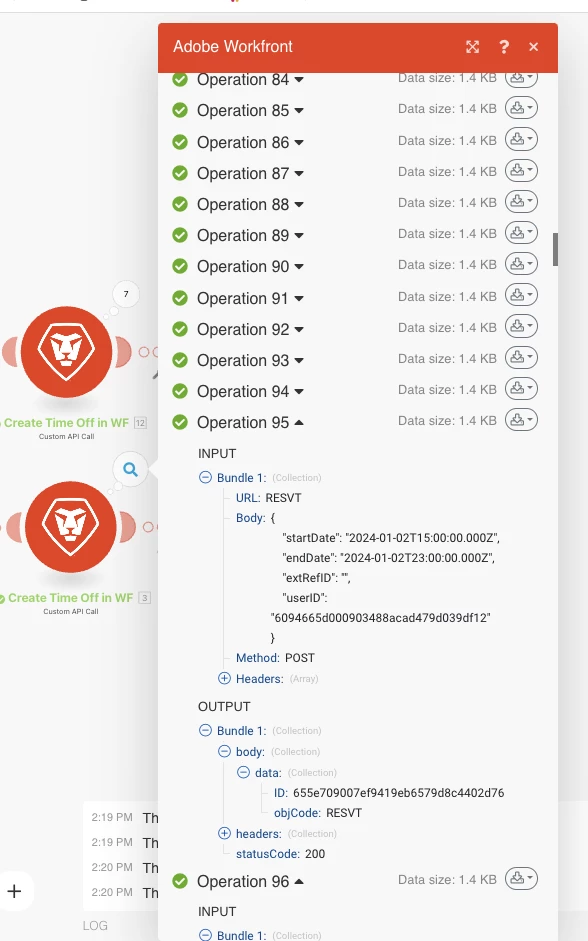
  • I had to manually expand each operation bundle (screenshot attached) from the successful import to then find the Time Off ID, and then copy it to a new CSV to be used in my deletion scenario.
  • Opening every operation bundle for over 100 operations was painful, and I was hoping there was an easier more efficient way to get all the Time Off ID's.

Translate
ChrisStephens
Community Advisor
Community Advisor
Nov 28, 2023 3:37 PM UTC

Oh ok, so you're trying to export them from a historical run? Sorry, I don't have any good ideas for that, I've always had to do it manually as painful as it is.

Translate