Level 3
Oct 22, 2024 2:56 PM UTC
Solved

Custom API call POST request

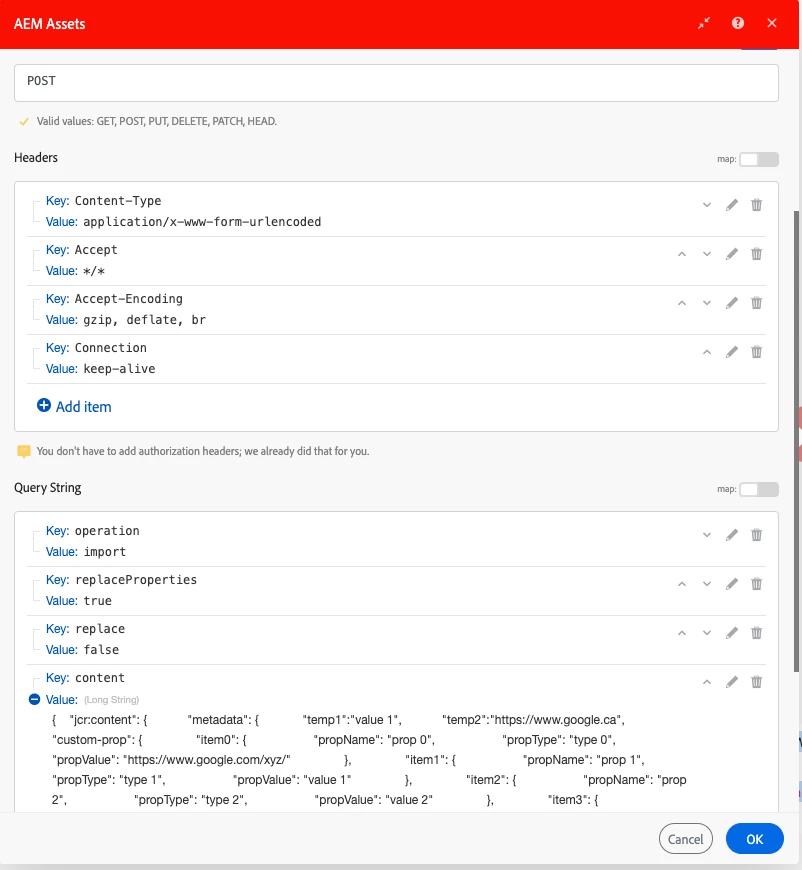
Hi, I'm making a post request using 'Make a custom API call' module from workfront fusion scenario and getting 500 Error. Could anyone suggest what changes are needed in below configuration? Thanks in advance!
 

This post is no longer active and is closed to new replies. Need help? Start a new post to ask your question.
aembeeAccepted solution
Level 3
Oct 30, 2024 5:09 PM UTC

This was resolved by setting the content into Request body instead of query string parameter

7 replies

Level 5
Oct 22, 2024 4:25 PM UTC

That's a very large string for content.  Typically, you'd set Content-Type to application/json and POST the body as the JSON itself.  What API are you trying to hit?

Translate
aembeeAuthor
Level 3
Oct 22, 2024 4:38 PM UTC

Hi @cverges I'm creating new nodes in AEM dam and need to make a POST call with content type application/x-www-form-urlencoded

Translate
Level 5
Oct 22, 2024 4:47 PM UTC

I don't have an AEM Assets connection, so I can't screenshot anything.  However, typically in the Custom API modules, there's a URL entry that points to a specific API endpoint (defined via mechanisms such as https://developer.adobe.com/experience-cloud/experience-manager-apis/api/stable/sites/).  To really understand what API you're trying to use and why it may be erring, what's the URL that's in your module?

Translate
Sven-iX
Community Advisor
Community Advisor
Oct 22, 2024 4:53 PM UTC

Hi @aembee 


I'm not worried about the content size, I've done larger but: 

  • use SetVariable module(s) prior to your AEM module and then use those variable in the AEM module. 
    I find it easier to troubleshoot that. 
  • validate the JSON to ensure there's no illegal char

I don't know what URL you're hitting here, but 500 means AEM didn't like what you sent. Could be content type; names of parameters etc. 

Do click the toolkit icon in Fusion to see the actual call made. And check that it 100% matches what the Assets API spec expects. 

Translate
aembeeAuthorAccepted solution
Level 3
Oct 30, 2024 5:09 PM UTC

This was resolved by setting the content into Request body instead of query string parameter

Translate