
KariB93WI
Level 2
Nov 6, 2026 4:25 PM UTC
Solved

Changing sharing permissions on document folders via Fusion

I need to to set sharing permissions on a document folder in every project. We want one folder for internal reviews with restricted access. If I create the folder in the project template, the sharing settings don’t carry over. 

I attempted the instructions in this old post. 

I'm getting a [422] invalid id Runtime error. I have triple checked the ID.

URL: 
api-unsupported/DOCFDR/{folderID}?fields=accessRules

Body: 
{"accessRules":[{"accessorID":"{groupID}","coreAction":"VIEW","accessorObjCode":"GROUP","securityObjCode":"DOCFDR","forbiddenActions":[],"secondaryActions":[]}]}


Does anyone have any updated information for folder sharing via Fusion? 
BrookeSt5Accepted solution
Level 2
Nov 6, 2026 7:04 PM UTC

Hi. We recently created a Fusion process to add folders and create sharing permissions. The API call we’re using that works is slightly different. The body accessRules noted in the above comments should work with accessorID to be the ID of the group, role, teamob, user, etc and the securityObjID to be the folder ID.


18 replies

ChrisStephens
Community Advisor
Community Advisor
Nov 6, 2026 5:07 PM UTC

I just tested it and this still works for me, are the values mapping in properly?

For reference, my tested body:


{"accessRules": [{ "objCode": "ACSRUL", "accessorID": "group ID here", "coreAction": "VIEW", "securityObjID": "folder ID here", "securityObjCode": "DOCFDR", "accessorObjCode": "GROUP", "forbiddenActions": [], "secondaryActions": [] }]}


URI: attask/api-unsupported/DOCFDR/folder ID here

method: PUT

Translate
KariB93WI
KariB93WIAuthor
Level 2
Nov 6, 2026 6:15 PM UTC

Is the accessorID for a group different than the GroupID? 
The accessorID in the DevTools doesn’t match the GroupID in a WF report. 
(I tried both and I’m still getting the error)
 

RuntimeError

[422] invalid id

I don’t think it’s the FolderID since this URL resolves in my browser: 
https://akohlerco.sb01.workfront.adobe.com/attask/api-unsupported/DOCFDR/{folderID}


Translate
ChrisStephens
Community Advisor
Community Advisor
Nov 6, 2026 7:53 PM UTC

I can’t tell what’s in that accessorID field, but yes, it should be group group ID, the 17-character ID that’s in the URL when looking at the group, and that can only be 1 group. If you’re trying to share multiple groups, then there should be multiple collections in the accessRules array, 1 for each group.

Translate
BrookeSt5Accepted solution
Level 2
Nov 6, 2026 7:04 PM UTC

Hi. We recently created a Fusion process to add folders and create sharing permissions. The API call we’re using that works is slightly different. The body accessRules noted in the above comments should work with accessorID to be the ID of the group, role, teamob, user, etc and the securityObjID to be the folder ID.


Translate
KariB93WI
KariB93WIAuthor
Level 2
Nov 6, 2026 8:51 PM UTC

Thanks, ​@BrookeSt5 , that module updates the permissions as expected. 

Missing from your answer is that you must use the Query Strings to capture the values. There is a 200 Error which AI says I can ignore with an error handler. 


Translate
Level 2
Nov 6, 2026 9:09 PM UTC

It looks like we get the same result having the code in the Body section vs the Query String. Looking at your image, it seems we have basically the same codes, just the syntax differences. Could be in how we’re arriving at this module too, with specific filters and a separate API module for each document folder.  Thanks!

Body:

accessRules=
[
    {
      "objCode": "ACSRUL",
      "accessorID": "621e4…...…...8e4",
      "accessorObjCode": "TEAMOB",
      "coreAction": "EDIT",
      "securityObjID": "{{18.ID}}",
      "securityObjCode": "DOCFDR",
      "forbiddenActions": [],
      "secondaryActions": []
    }
  ]&objCode=DOCFDR&objIDs=["{{18.ID}}"]&options={"removeInheritedAccess":true}&removalOptions={}
 

Translate
Interconnected
Level 2
Nov 18, 2026 7:15 PM UTC

Hi ​@BrookeSt5 and ​@KariB93WI - fascinating conversation above, I came across it when looking to do the same (because folder permissions do not persist on ‘create from Template’ or ‘copy Object’, Fusion seemed to be the place to go).

I’ve been trying all sorts of patterns, I think I actually got it to work once because the permissions were on the folder, but I was focused on the 200 error and forgot to check how it happened (it can get a bit foggy after 40 runs).

I’m wondering if you can run some eyes over this code that I feel should work, but doesn’t at the moment, and see if you can spot what I might be doing right and wrong please.


Translate
Level 2
Nov 18, 2026 7:28 PM UTC

​@Interconnected try changing the coreAction to “EDIT” instead of Manage. Edit equates to Manage permission in the folder (at least it did for my scenario).

Translate
Interconnected
Level 2
Nov 18, 2026 10:03 PM UTC

​@BrookeSt5 - changed to Edit in both occurrences, unfortunately - no difference.


Translate
Level 2
Nov 18, 2026 10:50 PM UTC

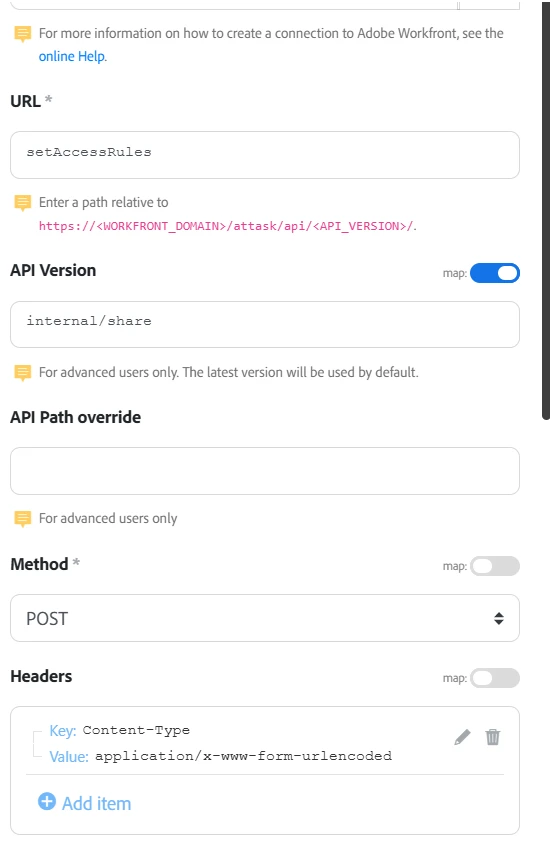
​@Interconnected It may be the other settings on the API call. I’ve posted a screenshot of how my module was setup with “setAccessRules”, “internal/share” for API version, POST for method, and “application/x-www-form-urlencoded” for the value of the header. Otherwise the body you posted looks relatively the same, except for the EDIT coreAction noted above. 

Translate
Interconnected
Level 2
Nov 19, 2026 7:05 AM UTC

Its strange.. .with POST, it returns a 422 - with PUT it returns a 200

Simplifying the JSON a little to a single USER entity….

All settings appear to match yours, bar the PUT…. 


Would you mind posting a screen-grab of a successful operation where sharing worked please?

Translate
Level 2
Nov 19, 2026 2:11 PM UTC

I think you’re close, but the body syntax is off slightly. In my successful operation there isn’t a { } bracket around the body. also, my access rules line is slightly different. try this syntax:

accessRules= [ { codes/ids/actions/ as you have them } ]

Remove the extra { } from before accessRules and at the end. That along with POST looks like it should work.


Translate
Interconnected
Level 2
Nov 19, 2026 3:46 PM UTC

Thanks again Brook - I tried this and still no luck. I tried also what ​@ChrisStephens wrote (using PUT becuase POST returns a 422, and application/json - note that Chris has the {“accessRules”:[  at the start of his body), returns a 200 error, no change to the permissions.


This is frustrating. I’m not giving up yet.

Translate
ChrisStephens
Community Advisor
Community Advisor
Nov 19, 2026 10:07 PM UTC

The content type should be application/json, is that what you’re sending?

Translate