
Laramie_Newborn
Level 2
September 14, 2026
Question

Can Watch Module Filter in Fusion be updated to look at all project custom forms instead of just the first one?

  • September 14, 2026
  • 5 replies
  • 41 views

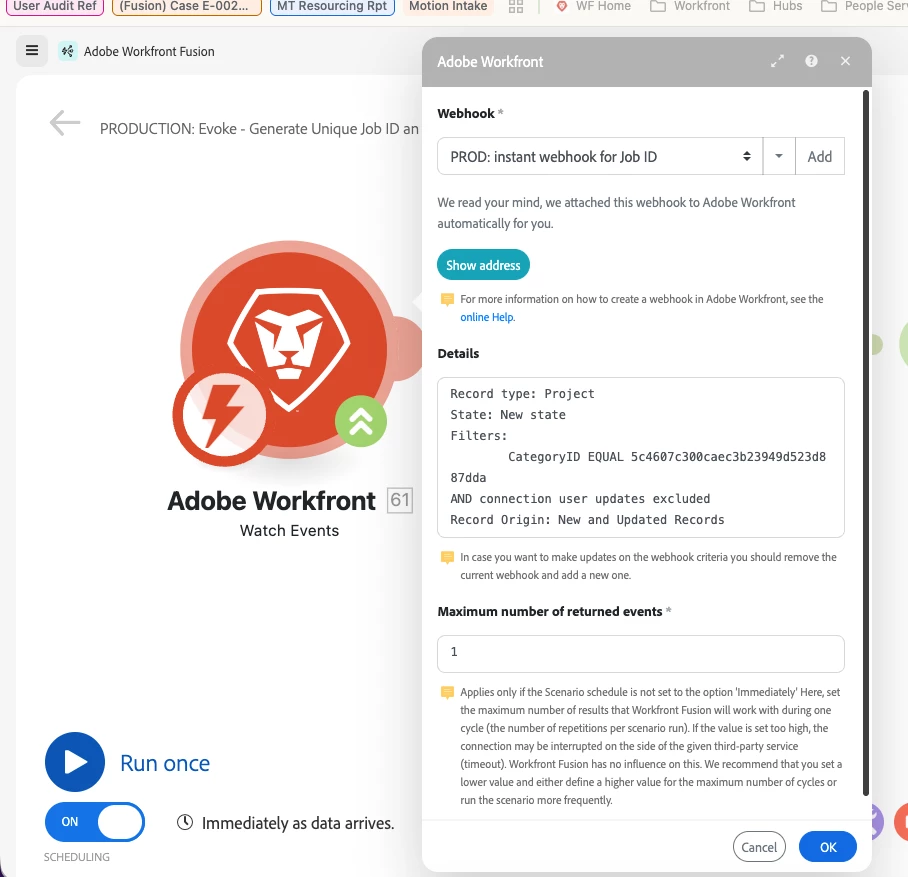
We have a Fusion Scenario Watch Event module that filters in projects based on the category ID. We have recently discovered that, because the filter is set as “CategoryID Equal”, it’s only pulling in projects where that custom form is the first one on the project. 


Since the relevant custom form is not always listed first on projects, is there a way to update this filter to look through all of the custom forms on a project instead of just the first one?
 

I’m not too well versed in Fusion but am not finding an option to manually change it to something like “CategoryID Exists”.
 

5 replies

Level 2
September 14, 2026

Hi,

You should be able to edit the webhook, if you click on the triangle icon next to the Fusion Webhook name you will get an edit option - 


And once you are on the edit dialog you should be able to choose ‘Exists’ operator as shown in screenshot below -


Hope this helps.

Laramie_Newborn
Level 2
September 14, 2026

I looked at the “Exists” option but, it does not allow me to specify which custom form I want it to look for on the project. Unless I’m completely missing that option somewhere?

Level 2
September 14, 2026

The "Exists" operator only checks whether at least one Category ID is present. If you need to evaluate multiple custom forms, use the "OR" operator and specify the required Custom Form IDs. - 


tibormolnar
Level 4
September 15, 2026

Hi ​@Laramie_Newborn ,

if i understand correctly, you want the webhook to be triggered any time a project is created / edited, that has one particular custom form attached, regardless of the position (categoryOrder) of the form.

I don’t think you can do this in a Workfront Watch Event module. You would need to filter on the objectCategories collection of the project, but that is a complex array. I can’t see this in the drop-down listing the filter options.

As a potential workaround, check if your custom form has a required field which is always populated. If yes, filter on that. If not, maybe add a calculated field that always equates to 1 and filter on that.

If all this fails, you can still create the webhook without filters and filter in the scenario itself (pull the project details right after the webhook module and proceed only if the objectCategories contains your form), but this is not ideal as your scenario will be triggered a lot more frequently than needed.

I hope this helps,

Tibor


ChrisStephens
Community Advisor
Community Advisor
September 15, 2026

As far as I’m aware you can’t key off of the categories field. What I usually do is just add a field with a default value to that form in an admin-only section, and then key off of that field instead of the custom form itself.