Workload Balancer Schedule / Date Issue | Community
Skip to main content
December 10, 2024
Question

Workload Balancer Schedule / Date Issue

  • December 10, 2024
  • 4 replies
  • 1113 views

Hi all,

I'm stumped on an issue with a user, but my gut tells me its a device setting rather than a Workfront issue. When the user view his WLB, his dates slip (each day  think) and roll into Saturday as shown below.
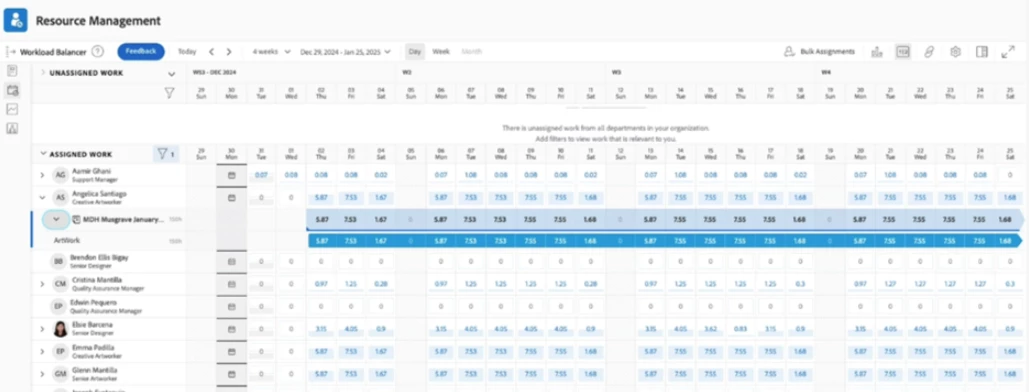
However when I look at is as me or logged in as him it looks like this:
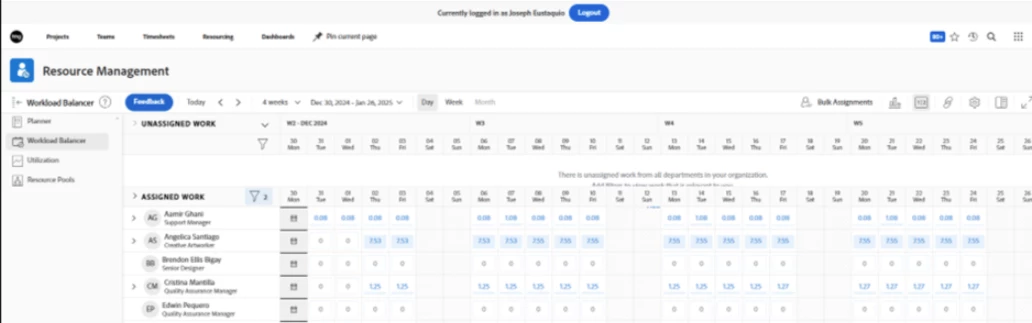
His user profile was templated using a similar profile. Any ideas what causes the difference? i.e he only has Sunday greyed out but I have Saturday and Sunday and therefore the hours are balancing differently? He's using a Mac and we've tried it on two browsers with the same outcome.


Thanks

Matt


This post is no longer active and is closed to new replies. Need help? Start a new post to ask your question.

4 replies

Kurt_Jones
Community Advisor
Community Advisor
December 10, 2024

Matt, have you looked at the user's schedule in his profile?  We have different schedules for users as we are global and holidays are different for various regions so that we have the right time-off days for folks.  

If my response answered your question, please mark it answered, so others can find the answer
December 10, 2024

Hi Kurt, yes, I checked that and compared it to a colleague who doesn't have the issue and they have the same settings  /schedules.


Thanks for the good idea though.


Matt

skyehansen
Community Advisor and Adobe Champion
December 10, 2024

are you both in the same timezone?

December 11, 2024

Hi Skye, no, we're in different time zones, but he's set up with the same settings as everyone else in his area, and I've not heard that anyone else has this problem.

When I log in as him, it looks fine as well. It's just his own view that seems affected.

Vey odd, I'll raise a support ticket to investigate.

Thanks!

Madalyn_Destafney
Community Advisor
Community Advisor
December 11, 2024

Seeing it's not user schedule or timezone in the profile based on other comments, have the user check their browser region/timezone settings. The due dates/times you see in task due dates is based on browser settings, not the Timezone setting in the user profile. When you log in as him, it would still look fine to you bc you're looking at it within your own timezone/browser settings, the 'log in as' doesn't take his settings into account.

If this helped you, please mark correct to help others : )
December 12, 2024

Hi Madalyn, I thought that as well but did some tests across different browsers and the issue is the same.


Thanks

Matt

December 12, 2024

A update for anyone following this thread - initially we were told it only affected one user in the region hence why I though it could have been device or browser settings.

But last night I was told that it affects at least another three users, so it's more likely WF. I still can't crack it after testing time zone & schedule options, so I've raised a ticket for a support call. I'll update this thread with the result as I had not come across this one before.

Thanks for all your input
Matt


KellieGardner
Community Advisor
Community Advisor
December 12, 2024

Interesting. I would assume as the others did it's tied to schedules somehow. Maybe Project schedule vs user schedule. I always hesitate to use multiple schedules for this reason. It gets really tricky in some areas. 


Looking forward to hearing what support says. 

December 13, 2024

Hi Kellie, I thought the same, but doing some live testing with the user still showed the same issue. It's such fun one. Call with support is later today.

Thanks
Matt