Working live link in calculated field | Community
Skip to main content
Level 2
October 3, 2025
Solved

Working live link in calculated field

  • October 3, 2025
  • 1 reply
  • 322 views

Hello, Community

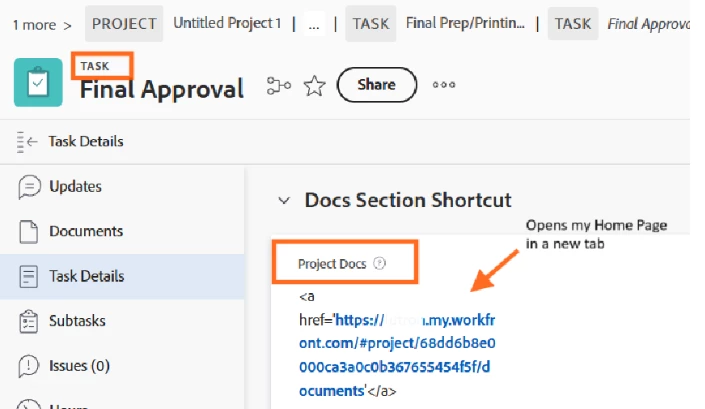
I created a calculated field in a Task Form with the intention of having the user "clicking" on a live link that will take them to the Project's Documents section (if it were to a specific Template Folder even better! but I think that would require Fusion help...)


Although the Project URL displays correctly, the link takes me to my Home Page.

Here is the formula I used:
'   CONCAT("<a href='https://orgname.my.workfront.com/#project/",{projectID},"/documents'</a>")  '
 
What am I missing...?
 

Best answer by MaddyMa

Hi! 
I played with this in my instance and got it to work using this code: 

CONCAT("https://ORGNAME.my.workfront.com/project/",{projectID},"/documents")

 Let me know if that works for you! 🙂 

1 reply

MaddyMaAccepted solution
Level 2
October 3, 2025

Hi! 
I played with this in my instance and got it to work using this code: 

CONCAT("https://ORGNAME.my.workfront.com/project/",{projectID},"/documents")

 Let me know if that works for you! 🙂 

Level 2
October 3, 2025

It did! So close, but yet far.

Thank you, MaddyMa!


Level 2
October 3, 2025

Happy to help! I tried to get it to direct to a specific folder but ran into a block at the correct field name. While this code doesn't work as intended yet, maybe it can help you get a little closer to your finish line. 👍


CONCAT("https://cfmapproval.sb02.workfront.com/project/",{projectID},"/documents","?initialFolderID=",{project}.{documentFolderID})

You should even be able to submit this code in a ticket to have Support help identify the correct field combination to replace {project}.{documentFolderID}

Best of luck!