Hi there!
1. Assign different reviewer and approval proofers to different pages or areas: No, approvers on a proof are for the whole proof, you can't have an approver on page 1, a different approver on page 2, etc. My recommendation is putting everyone you need on it and indicating in the proof email notification or a comment on the document tagging everyone, saying person A pls review pages 1-3, person B approve pages 4-7, etc.
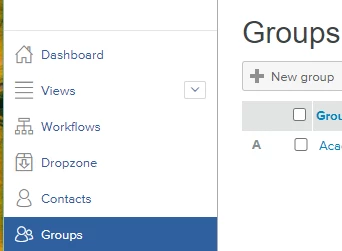
2. Can a review and approval task be assigned to a group of people instead of individual users. You can't assign a WorkFront Group but you can assign a Proof Group. Go to the Proofing page from main menu > Groups > New Group. From there you can enter the WF contacts to include, so anytime you have a proof for the same set of people to review, you can add the proof group. More info here.
3. For the approve and approve with changes decisions can I stop workfront from sending out new versions of proofs that require another proof approval. When you upload a new version of a proof, WF automatically adds whoever was on the previous version on default, but when a new version is uploaded the creator can remove the group/contacts that are added from the last round before completing the new version upload. Removing them would mean no notifications are sent to them.
If this helped you, please mark correct to help others : )