Level 3
May 21, 2026
Solved

Workfront Project not pulling in Task report

  • May 21, 2026
  • 5 replies
  • 48 views

I am pulling a Task report and grouping by Project Name. One particular project meets the filter criteria, but I can’t figure out why it isn’t pulling into the report. Can someone please look at the screenshots and tell me what I’m missing?


Filter Criteria

 

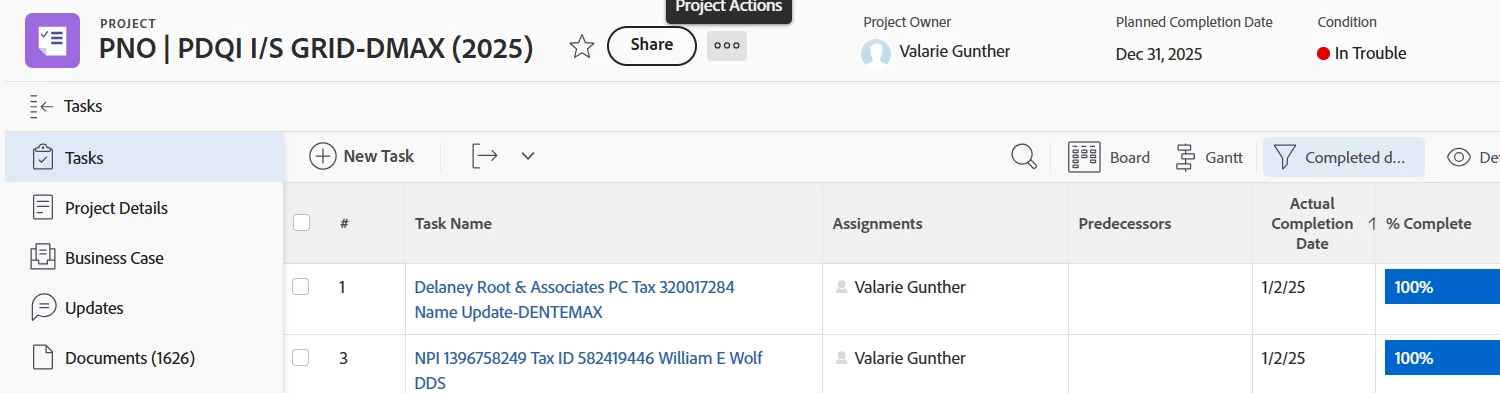
Project Details - none of these tasks for this user are showing in the report, but meets the criteria. All of the other Projects for her are capture here, best I can tell. But I’m afraid if this one is missing, others may be too.
 

Best answer by PaulaB02

I am so sorry, everyone! Rookie mistake. I didn’t notice that my report is over 10,000 tasks and only showing 2000 results. When I exported the expected project was actually in the report. My apologies for wasting your time but I sincerely appreciate everyone that tried to help me!

5 replies

skyehansen
Community Advisor and Adobe Champion
May 21, 2026

asking the obvious question… do you have two valarie gunthers in the system? (sometimes my users like to go away and come back with a different email address)


Do you have anything else in your filter list or just those two filters?

PaulaB02Author
Level 3
May 22, 2026

No, there is only one staff member by that name. Those are the only two filters I have for this particular report.

Level 2
May 21, 2026

Project status exclusion — Workfront has a system-level setting that can exclude tasks from projects in certain statuses (Complete, Dead, On Hold) from task reports. If that project recently moved to a closed status, tasks inside it can disappear from reports even if they meet every filter condition. Worth checking the project's current status against your system preferences.

Assignment vs. Project Owner — I can see Valarie is both the Project Owner and the task assignee. The filter is on Assignment Users >> ID which should catch task-level assignments correctly, but worth confirming the tasks were directly assigned to her and not just inherited from project ownership.

skyehansen
Community Advisor and Adobe Champion
May 21, 2026

@devanshu16  can you cite your source for this? I don’t see anything in the documentation that states that a task is excluded if it’s from complete, dead or on hold projects -- in a classic report -- in fact usually they are included, and we report builders need to purposefully exclude these sorts of tasks by filtering project statuses that we want/don’t want to see.

Level 2
May 21, 2026

I've personally run into situations where tasks from certain projects weren't showing in reports and project status ended up being the culprit. But maybe the actual condition could have been something else.

Level 2
May 22, 2026

just yesterday I came across a very similar issue, missing projects and tasks from a report.  I’m stumped and plan on putting in a Support request today.  

PaulaB02Author
Level 3
May 22, 2026

Thank you! I was hoping to get some ideas here on how to resolve, but I will most likely have to submit a support ticket as well.

KatherineLa
Community Advisor
Community Advisor
May 22, 2026

This is an obscure suggestion, but I’ve seen it throw things on occasion. Were those two tasks ever closed, re-opened and closed again? My suspicious is that something is off there, if you get other tasks for her but not these two specifically.

The other thing I’d do is go into the system activity for those tasks and the project itself and look for anything else unusual that might have happened with them - maybe deleted/restored? 

After that, I’d go into the full details tab for each task, opening one task that IS pulling into the report correctly and comparing everything there against this task. Look at the Assignments data specifically, is anything different between the two tasks there? 


PaulaB02AuthorAccepted solution
Level 3
May 22, 2026

I am so sorry, everyone! Rookie mistake. I didn’t notice that my report is over 10,000 tasks and only showing 2000 results. When I exported the expected project was actually in the report. My apologies for wasting your time but I sincerely appreciate everyone that tried to help me!