Workfront New issue creation "Status" drop down field Status field | Community
Skip to main content
Level 2
May 9, 2023
Solved

Workfront New issue creation "Status" drop down field Status field

  • May 9, 2023
  • 2 replies
  • 780 views

Does anyone know how to change the order of the Statuses in the Status Drop Down field on a new request? By default, Submitted in the first status in the list. We want to make that a different status.


I have attached an image to this post. We have already rearranged the statuses in setup under Preferences, Statuses, System Status but that had no affect on the drop down list.
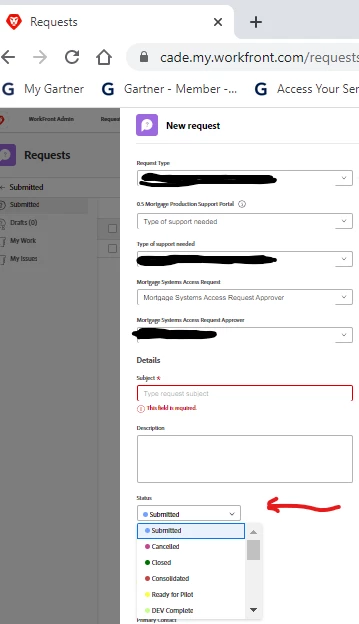
 

Thanks

This post is no longer active and is closed to new replies. Need help? Start a new post to ask your question.
Best answer by skyehansen

Yes, that's the correct way to order the statuses... kind of. You would just want to make sure that the group that the project is set to is the group you select to set the order on, in the Setup area.


e.g. if the project containing the request is set to the Marketing groupID you should change the order of the statuses on the Marketing group rather than the System.


Potentially if you remove the groupID from the project, the system statuses and their order might then come into play, but I really recommend against that.

2 replies

skyehansen
Community Advisor
skyehansenCommunity AdvisorAccepted solution
May 9, 2023

Yes, that's the correct way to order the statuses... kind of. You would just want to make sure that the group that the project is set to is the group you select to set the order on, in the Setup area.


e.g. if the project containing the request is set to the Marketing groupID you should change the order of the statuses on the Marketing group rather than the System.


Potentially if you remove the groupID from the project, the system statuses and their order might then come into play, but I really recommend against that.

CadAdminAuthor
Level 2
May 9, 2023

As a follow up, depending on what type of request you are targeting, you will have to select the issues tab then select for Change Request, Trouble Ticket or Request and then move your statuses into your preferred order. There are other options there but I didn't list them all.

Thanks!!