Workfront Calculated Field Help | Community
Skip to main content
sydney_peterson
Level 3
April 24, 2023

Workfront Calculated Field Help

  • April 24, 2023
  • 5 replies
  • 3039 views

Hi! 

We are currently experiencing an issue on our projects where we have an approval process. The problem is, the approval process is based on job role, but multiple users can have that job role and have the ability to approve even if they are not assigned as the job manager on that particular project. 

I'm hoping to add a column to a report that will list the job manager assigned as the approver in this case, meaning they are assigned to the job management task on the project. 

The fields that are pulling into this section of a dashboard sit on a parent task, so they are task fields. 

I'm wondering if I can add a calculated field on this form that would reference the job manager assigned to the task on the project and then that person's name would pull into the report. 


The task name is Job Management - I want to show the name of the assignee of the task when the task name contains job management. 

Is that possible in this scenario? 

My manager has recently left the company and has an instance of Workfront that is very text mode and automation heavy. My background in Workfront is very much on the native functionality side with enough text mode knowledge to get by at least where I came from. I would really appreciate any help on this, as I'm not in a position right now to ask for a consultant. 

Thank you in advance for any insight you can provide. 
 

This post is no longer active and is closed to new replies. Need help? Start a new post to ask your question.

5 replies

RandyRoberts
Community Advisor
Community Advisor
April 25, 2023

So the job mnager would be the person who is designated to approve this task, not the task assignee? Is the job manager listed on a project form anywhere? or just in the approval request?

sydney_peterson
Level 3
April 25, 2023
The job manager is actually the approver of the project. The approval is a project approval, not a task approval. 
 
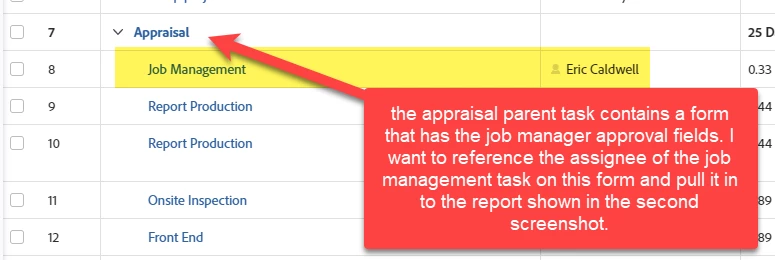
The job manager is assigned to the task “job management” on the project. That’s what I need to reference. The job manager is not listed anywhere on the project level unfortunately which is what makes this tricky. 
RandyRoberts
Community Advisor
Community Advisor
April 25, 2023

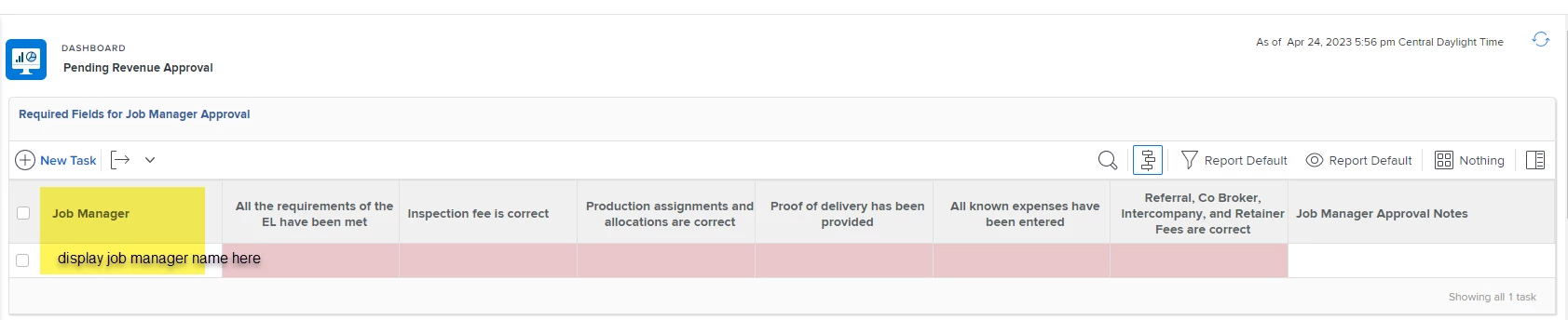
The "Required Fields For Job Manager Approval" report is a task report, right? If you're reporting on that task, you can just list the assignee (the job manager), right? I don't think I'm understanding what you want to do because that seems too easy. Are you trying to list the assignee of another task in this report? How does the contents of this report relate to the task in the project?

sydney_peterson
Level 3
April 25, 2023

Hopefully I can explain this well. 

the fields I’m pulling in on the first screenshot are custom form fields sitting on the appraisal parent task shown in the first screenshot. But I’m trying to show the assignee of the job management task and thought I could perhaps add it as a calculated field on the form that is already sitting on the appraisal parent task. 

if I can’t do that, I could add a calculated field on one of my project forms, that references the assignee of the job management task. In either case, I’m just not sure what the calculation would be. 

it’s a little tricky because we have a lot of data sitting on parent tasks, not necessarily project level or task (child task) level forms 

RandyRoberts
Community Advisor
Community Advisor
April 26, 2023

So you want to display a field in a task report that sits on the reported task's parent task, right?

sydney_peterson
Level 3
April 26, 2023

no I want to display the assignee of the child task "job management" 

Jason_JB
Level 5
April 27, 2023

The only solution I'm thinking of that would allow us to harvest information off of a specific child and populate it on a parent is along the lines of some Fusion automations we've done.  If you're interested, I'm happy to share details of what we've done.