There are two kinds of projects that can be considered "Request Queues"
1. A project that is published as a queue and its name appears in the dropdown menu under "Request Type" after the user clicks the blue "Submit Request" button on the Requests landing page.
2. Sometimes, a project from #1 above will route requests to a different intake project that has limited access. Users ofter refer to these projects as queues also.
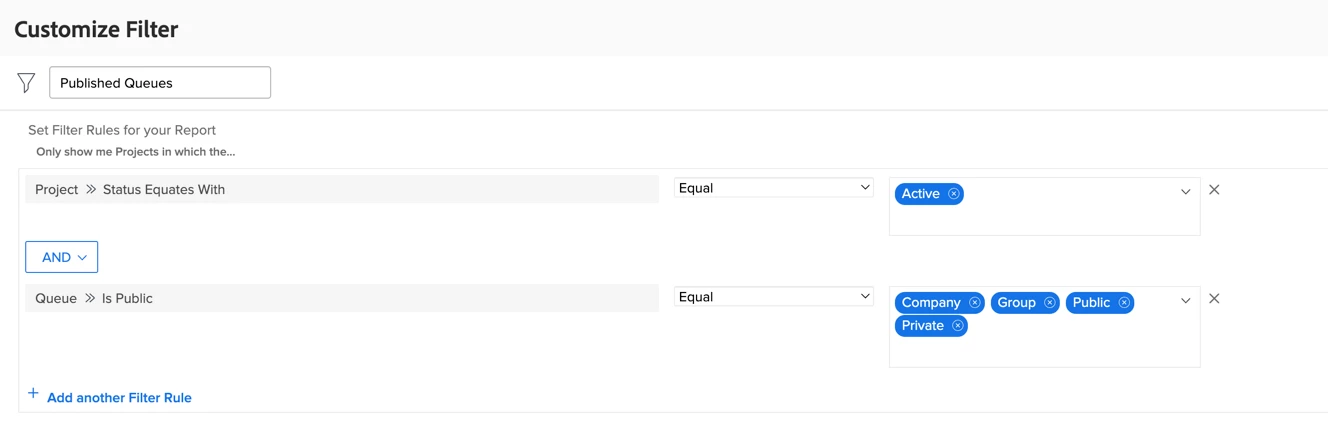
To pinpoint projects that fall into category 1 above (my personal nomenclature for these is "routing project"), you can use the "Published Queues" filter shown in the below screen capture.
To identify projects that fall into category 2 above (my personal nomenclature for these is "landing project"), you can use the below text mode:
EXISTS:a:$$EXISTSMOD=EXISTS
EXISTS:a:$$OBJCODE=RRUL
EXISTS:a:defaultProjectID=FIELD:ID
statusEquatesWith=CUR	PLN
statusEquatesWith_Mod=in