User with Reviewer role cannot open Proofs to approve them. | Adobe Higher Education
Skip to main content
Level 4
October 17, 2023
Risolto

User with Reviewer role cannot open Proofs to approve them.

  • October 17, 2023
  • 2 risposte
  • 826 visualizzazioni

I am trying to help out one of my users on the system. Currently they have a reviewer license. They are also set to manage, through inherited permissions, on the project that these proofs live on. However, when I go to open them, when I am logged in as her, I get an alert that states that I do not have access to view the proofs. But as admin, I have no issue with that. And when I look at the proof details, I see that the her old account (which I had to deactivate and delete) is the one that was assigned and when I remove it and try to add her to it under her valid account, it just pops back the deactivated account. Is there a way to resolve this, or will we have to reupload the proof to the form from scratch?
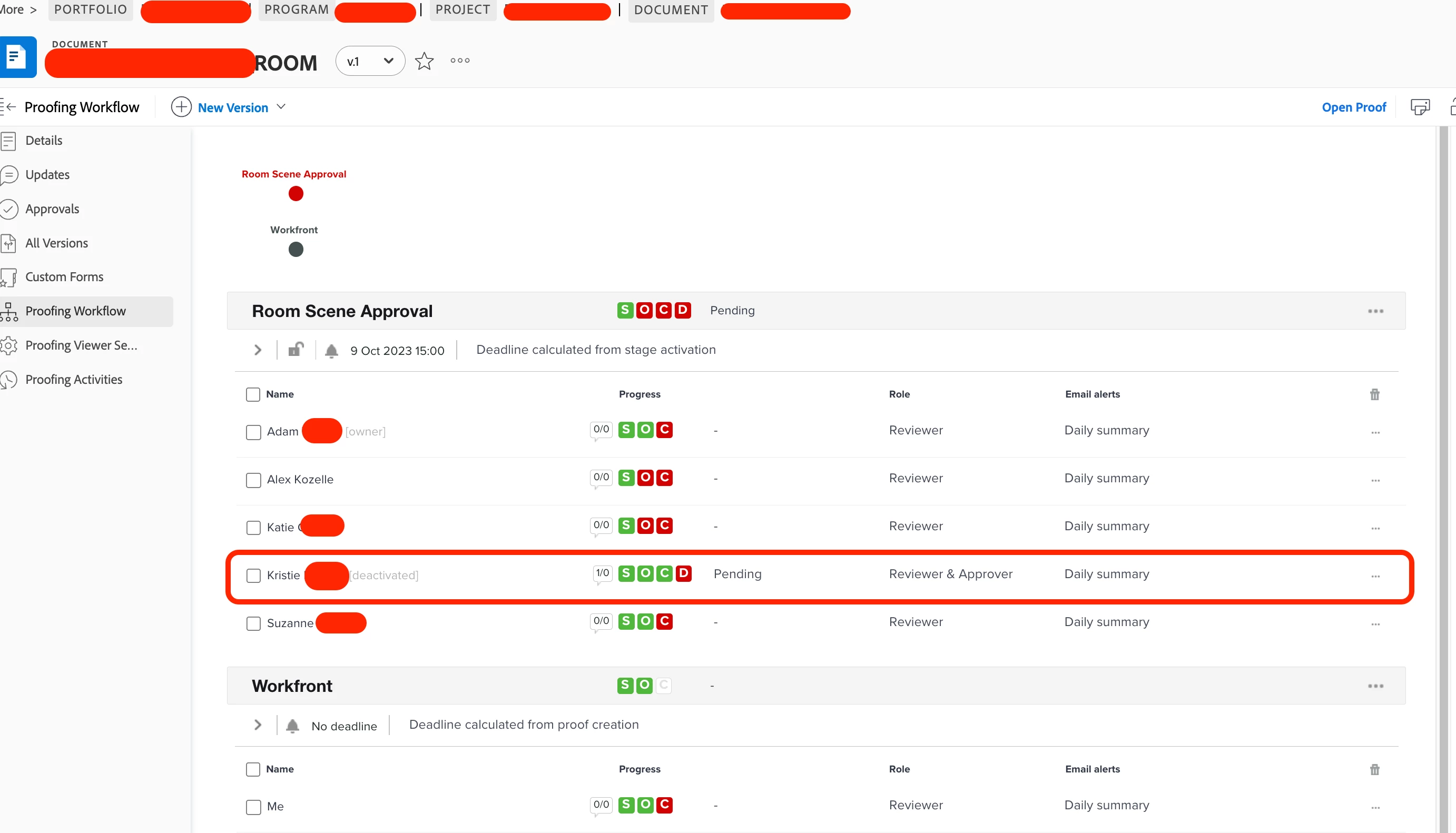


Thank you!

Questo argomento è stato chiuso alle risposte.
Migliore risposta di MPH2

It turns out that in order to prevent the proof from pulling the deleted account when I looked for the same user's active account (which was created using our SSO), I needed to deactivate the current one and then reactivate it. For whatever reason, that allowed the system to pull in the proper account and the issue resolved itself. Thank you for all of your help. I really appreciate it.

2 risposte

Madalyn_Destafney
Community Advisor
Community Advisor
October 17, 2023

Does this proof utilize a proof workflow? If so, revise the workflow itself to have the user's updated account. In this proof, so it doesn't work if you completely delete that user from the stage and share the proof separately (proofing workflow > share) with the correct user account? If it keeps pulling up the deactivated one and not even associated with a workflow, have you cleared your cache in a while?

If this helped you, please mark correct to help others : )
MPH2AutoreRisposta
Level 4
October 18, 2023

It turns out that in order to prevent the proof from pulling the deleted account when I looked for the same user's active account (which was created using our SSO), I needed to deactivate the current one and then reactivate it. For whatever reason, that allowed the system to pull in the proper account and the issue resolved itself. Thank you for all of your help. I really appreciate it.

Richard_Carlson
Community Advisor
Community Advisor
October 17, 2023

Can a review actually effectively manage anything in Workfront permissions wise?  My understanding is that this might not be possible.  Does it work if you elevate this person's role to a paid license above Reviewer, like Worker?  What is it that you want to manage, the proofing workflow?  I would question whether or not this was possible, permissions wise.


If you want to remove an email address from PHQ you can go into the PHQ back end, look up the specific user or email address and either modify or delete it.