
Trying to get report filters, views & groupings under control (Attached PNG) | Community
Skip to main content
RandyRoberts
Community Advisor
Community Advisor
December 10, 2020
Solved

Trying to get report filters, views & groupings under control (Attached PNG)

  • December 10, 2020
  • 3 replies
  • 1134 views

I'm prepping for a transition to NWE and cannot understand how to get Filters, Views and Groupings under control. I decided to use a user report to try and understand how it works... or doesn't.

I've attached a little comparison of what I see in the:

Report Dropdown,

Setup > Views List,

Setup > List Controls,

Setup > User Layout,

Remove Views Dialog box.

Unfortunately, some things just don't make sense and there is little to no documentation available.

Some items appear in all five places while some mysteriously are there or not. Some things are in List controls but I cannot make them visible to the user in the User Layout.

From attached PNG:

Why can't I edit or remove "Standard" from List Controls? It's useless.

In Setup>List Controls I see "Resource Grid" and "Group Members List". Where did they come from? I cannot view them or add them to the dropdown in a report.

If I try to add "Resource Grid" or "Group Members List" to the User Layout, it doesn't find it. Where did they come from?

What is the hierarchy between List Controls and User Layout? Does one override the other? Are they additive?

Why can't I edit "Working On" or "User Registration"? Where did they come from? It's not in the Setup>Views List. It seems like, if it's not in the Setup>Views List, it can't be edited or deleted, just hidden from view.

I don't want to have to recreate all these views just so i can edit and optimize them. Should I just bite the bullet and do that? Can I permanently delete all the views I cannot edit? How?

Why is this such a mess?
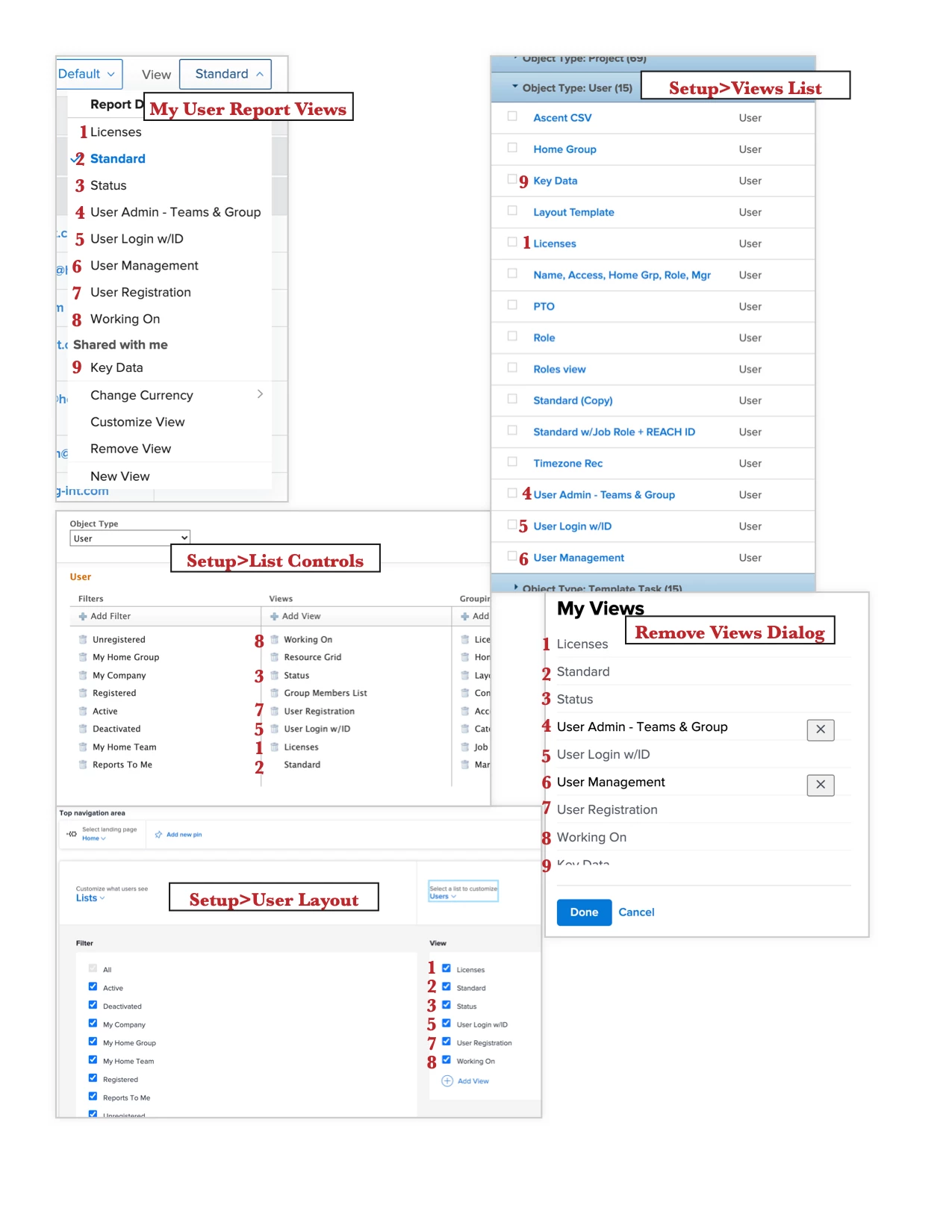
Tx

This post is no longer active and is closed to new replies. Need help? Start a new post to ask your question.
Best answer by imgrund

Hi - here is my understanding of things while using the tool the last 7 years.

View list in Setup (under Interface): This shows all items that have been created by users. It does not show out of the box ones that Workfront provides. And since it is usually a long list, make sure you double check the filter as well as the items showing to make sure you see all of them (if you have over 2,000, I recommend exporting to Excel or PDF so that you see all the items under the right groupings.

List Control: is the Default for Users so this does not include anything they have created, what has been shared with them, and is overridden by a layout template if you attach one to them, their role, or their home team.

Layout Template: These are the items you want them to see by default, but remember this does not include anything that they have created or that has been shared with them outside the layout template. Prime example: I can see in your screenshot that someone shared Key Dates with you. So it makes sense it is not on the layout template because the Admin didn't put it on there, someone just shared it with you.

Side Note: Resource Grid and Group Member List were old Flash Reports and flash has been removed from the system. Don't worry about them.

Hope this helps.

3 replies

imgrund
Adobe Employee
imgrundAdobe EmployeeAccepted solution
Adobe Employee
December 15, 2020

Hi - here is my understanding of things while using the tool the last 7 years.

View list in Setup (under Interface): This shows all items that have been created by users. It does not show out of the box ones that Workfront provides. And since it is usually a long list, make sure you double check the filter as well as the items showing to make sure you see all of them (if you have over 2,000, I recommend exporting to Excel or PDF so that you see all the items under the right groupings.

List Control: is the Default for Users so this does not include anything they have created, what has been shared with them, and is overridden by a layout template if you attach one to them, their role, or their home team.

Layout Template: These are the items you want them to see by default, but remember this does not include anything that they have created or that has been shared with them outside the layout template. Prime example: I can see in your screenshot that someone shared Key Dates with you. So it makes sense it is not on the layout template because the Admin didn't put it on there, someone just shared it with you.

Side Note: Resource Grid and Group Member List were old Flash Reports and flash has been removed from the system. Don't worry about them.

Hope this helps.

RandyRoberts
Community Advisor
Community Advisor
December 16, 2020

Thank you Anthony,

The Resource Grid & Group Member list were throwing me off!

Some better documentation would be really nice. I guess I'll have to go through each one by one and hide the built-in ones (if I can figure out which ones they are!) and re-create the "Standard" to the specs we can use.

I'm creating all new NWE layouts for the transition and I'm finding things I took for granted before that it turns out I never understood!

kynabaker16
Adobe Employee
Adobe Employee
December 16, 2020

Hi Randy,

When you say better documentation would be really nice, do you mean you'd like an article outlining which reports are built in, because I found this one that might be helpful... Or is there some other kind of documentation specific to filters and views you'd like to see? I'd love to pass the feedback on to the documentation team.

Thanks!

Kyna

kynabaker16
Adobe Employee
Adobe Employee
March 2, 2021

Hi Randy,

I just wanted to pop in here and let you know that our documentation team is making (has already made) updates to several articles based on your feedback. It's very helpful and will hopefully help others who may have similar questions in the future. I know it's been a while and it looks most of your questions were answered, but here's me closing this loop!

Kyna

RandyRoberts
Community Advisor
Community Advisor
March 5, 2021

Thanks Kyna, Could you post some links to the updated articles if you have it handy? I'm not sure which ones have changed.

kynabaker16
Adobe Employee
Adobe Employee
March 5, 2021

Hi Randy,

You bet. I got some more detail. Because your questions were touching a few different articles, they updated the following:

They also said in response to your question about "Resource Grid" or "Group Members List" to the User Layout it can't find it... you're not crazy. The Resource Grid view is a legacy flash view which means it's deprecated, you might want to log a bug for this so that we can get the dev team to remove these two options from the List Controls since they aren't visible anywhere else.

Can you still not edit "Working On" or "User Registration"? If so, they said it sounds like it might be a bug because our teams were able to edit/remove them.

In terms of recreating all the view to edit and optimize them, if you can't edit a view, you're not going to be able to delete them and some boxed views cannot be edited by design, so you could create copies of them and save them as new views, but not edit or delete them.

I hope this helps!

Kyna

Level 10
March 12, 2021

Not sure if I'm doing it correctly, but here's what I'm doing (we're moving to NWE as well):

  1. Set-up a Layout Template for that user/role case (everyone gets a layout template).
  2. Log in as a user with that template and examine their Filter/Views/Groupings.
  3. Modify the dropdown options via the layout template by either hiding the choice, or if I never want that choice in any role, use list controls to remove it system-wide.
  4. If a built-in one can't be hidden‚ĶI get really annoyed and move on. 😖 Sometimes this means our training materials have to mention we're stuck with it or not to use it because it makes no sense in our environment.
  5. Use list controls to add new selections I've created.
  6. If the built-on one is close, but needs an edit (which of course I can't), I create a new one and give it a different name. Traing people to use THIS one.

At least NWE lets me get rid of more of the default selections than Classic, but falls just short of letting me hide anything.

And oh yeah, it's tedious and slow, even if like us you only have eight layout templates or so. Planner roles mean alot of wading through the entire interface and tweaking things. And we always miss some nuance, so very iterative.