"To do list" report, filter out tasks that can't start yet due to constraint | Community
Skip to main content
Level 2
September 3, 2024
Solved

"To do list" report, filter out tasks that can't start yet due to constraint

  • September 3, 2024
  • 1 reply
  • 526 views

Hi,


I have a "My to do List" report for tasks. It already uses the built in filter "Can Start", but that seems to only apply to parent tasks and predecessors that are/aren't completed yet, making the sub task can/can't start.


I would like the report to also filter out tasks that have a task constraint of "Must Start on" or "Start no earlier than" with a constraint date greater than today. If they can't start yet, I don't want it on the to do list.


I don't seem to be able to do this with the built in filters of "constraint type" and "constraint date". No matter what I do I wind up filtering out things I don't want to.


Would somebody please be kind enough to show me the text mode filter to filter out tasks with "Must Start on" or "Start no earlier than" constraint types with a constraint date greater than today?
This post is no longer active and is closed to new replies. Need help? Start a new post to ask your question.
Best answer by KatherineLa

I would expect the filter method you're describing to result in the expected records, but you may need a compound filter to get multiple sets of data that match different requirements. 


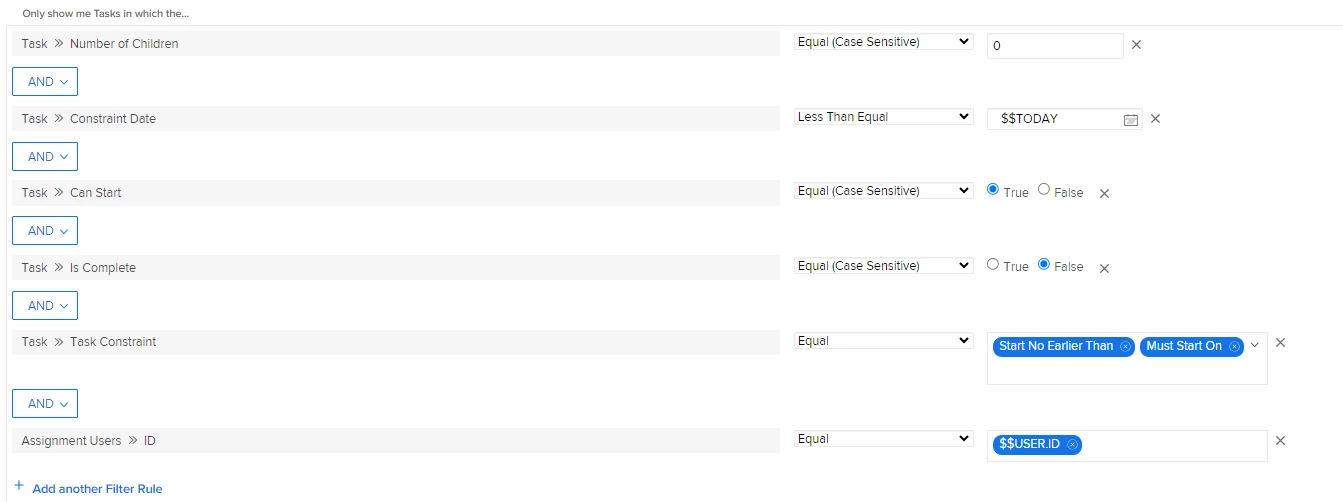
The screenshot below is how I'd set-up the first half of your ask in my environment. But that also inherently dropped every task that did NOT have one of those two constraints. So I'd create a second filter group as below.


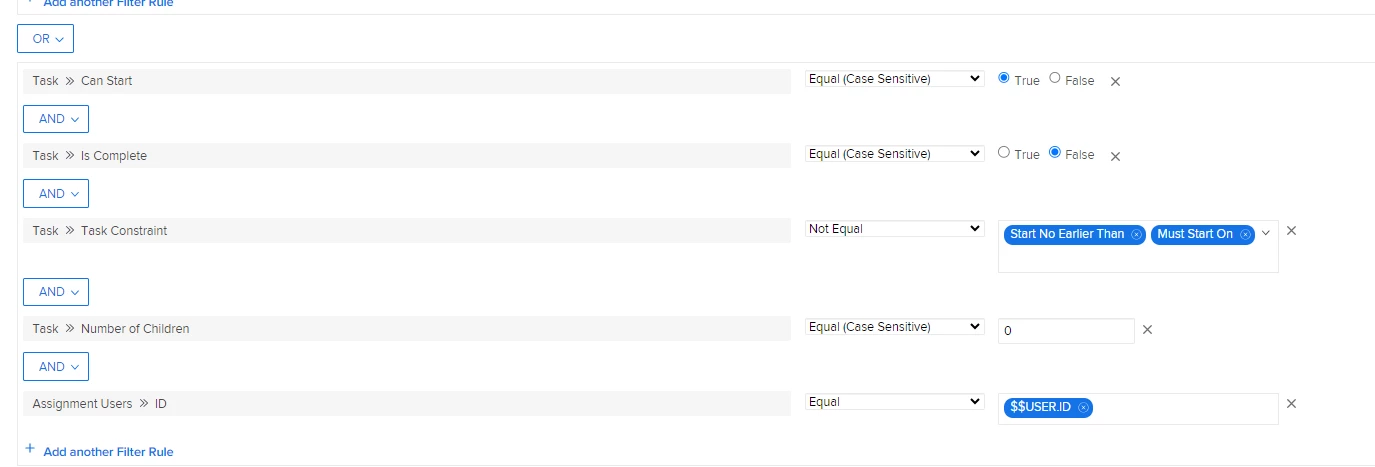
Then you'll start a second filter group for what you want to get when the Task Constraint ISN'T one of those two options. This would need whatever date constraint made sense for those records still, if appropriate. As written below, it will show you any open task that's ready to start even if it's not technically schedule for awhile yet. 


If this still doesn't get you what you expect, I'd put all the possible dates into a grid and start trying to isolate what's different about the ones that are getting dropped unexpectedly. 

1 reply

KatherineLaCommunity AdvisorAccepted solution
Community Advisor
September 4, 2024

I would expect the filter method you're describing to result in the expected records, but you may need a compound filter to get multiple sets of data that match different requirements. 


The screenshot below is how I'd set-up the first half of your ask in my environment. But that also inherently dropped every task that did NOT have one of those two constraints. So I'd create a second filter group as below.


Then you'll start a second filter group for what you want to get when the Task Constraint ISN'T one of those two options. This would need whatever date constraint made sense for those records still, if appropriate. As written below, it will show you any open task that's ready to start even if it's not technically schedule for awhile yet. 


If this still doesn't get you what you expect, I'd put all the possible dates into a grid and start trying to isolate what's different about the ones that are getting dropped unexpectedly. 

GrantThAuthor
Level 2
September 4, 2024

Thank you!