
To define workflow for Task Statuses | Community
Skip to main content
Heena_Shirke
Level 2
March 21, 2024
Solved

To define workflow for Task Statuses

  • March 21, 2024
  • 2 replies
  • 337 views

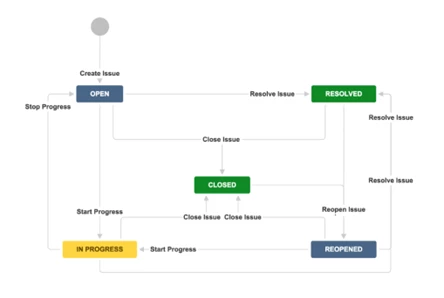
Can we set a workflow for statuses wherein we can define what are the next available statuses based on current selected status? For e.g.:
 

This post is no longer active and is closed to new replies. Need help? Start a new post to ask your question.
Best answer by RowvillBh1

Hey @heena_shirke ,


There is no built in native functionality to create status paths. This is a great idea and you should add it to the ideas section of this community. Nevertheless, you can explore two other alternatives - 


  1. Set up a Fusion scenario that listens for status changes.
    • If an “invalid” status transition is detected, revert the change, notify the user, or correct it.
  2. Workfront Boards lets you define columns for statuses and you can restrict movement between columns. But this does not apply to the classic list view and will not update the status of your underlying tasks on the board.

-Rowvill

2 replies

RowvillBh1
RowvillBh1Accepted solution
Level 5
July 14, 2025

Hey @heena_shirke ,


There is no built in native functionality to create status paths. This is a great idea and you should add it to the ideas section of this community. Nevertheless, you can explore two other alternatives - 


  1. Set up a Fusion scenario that listens for status changes.
    • If an “invalid” status transition is detected, revert the change, notify the user, or correct it.
  2. Workfront Boards lets you define columns for statuses and you can restrict movement between columns. But this does not apply to the classic list view and will not update the status of your underlying tasks on the board.

-Rowvill

kautuk_sahni
Community Manager
Community Manager
July 16, 2025

@heena_shirke Just checking in — were you able to resolve your issue?
We’d love to hear how things worked out. If the suggestions above helped, marking a response as correct can guide others with similar questions. And if you found another solution, feel free to share it — your insights could really benefit the community. Thanks again for being part of the conversation!

Kautuk Sahni