Third Quarter 2026 interface changes - 'Waffle' menu going away? | Community
Skip to main content
Level 3
July 8, 2026
Solved

Third Quarter 2026 interface changes - 'Waffle' menu going away?

  • July 8, 2026
  • 4 replies
  • 151 views

Can anyone confirm that the menu bar layout will be changing for all users in the July 16, 2026 release?

It’s mentioned on this page:
https://experienceleague.adobe.com/en/docs/workfront/using/product-announcements/product-releases/release-26-q3/26-q3-release-overview#other-enhancements


And this page shows screenshots of the new layout, which matches what’s in Preview:
https://experienceleague.adobe.com/en/docs/workfront/using/basics/navigate/global-navigation-overview


I just want to make sure it’s clear that the ‘waffle’ menu (the grid of nine dots in the upper right) is now being replaced by the ‘Main menu’ icon on the left, underneath the Workfront logo.  

The new ‘waffle’ menu in the updated layout only contains links to Admin Console and other broader Adobe account areas.
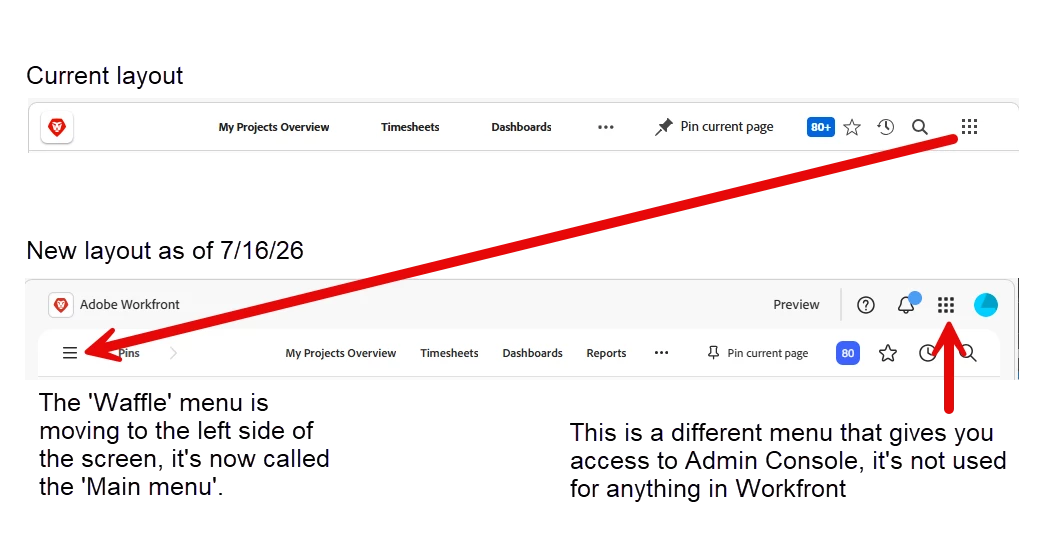
 

Do I have this right?  My users are sensitive to layout changes like this, so I want to make sure my communication is clear.  


Best answer by StutiTi

Hi ​@user01245 , you've described the new layout accurately, the Main menu on the left replacing the waffle menu is part of the Unified Shell (Adobe Unified Experience) experience.

One important clarification that will help your user communication: this navigation change is tied to the Unified Shell migration, which is a separate rollout from the quarterly 26.7 release. It is not simply switched on for everyone on July 16. Adobe has been rolling Unified Shell out to customers in phased cohorts, and whether your organization sees the new layout depends on when your org is migrated to Unified Shell rather than the release date itself. The migration is required for all customers over time, but the exact timing varies by org.

So before you communicate a hard date to your users, I'd recommend confirming your organization's specific Unified Shell enablement status and timing directly with Workfront Support or your account team, since that will determine when your users actually see the change. If your Preview environment already shows the new layout, that's a good sign your org is in the rollout pipeline, but Preview timing doesn't always match Production.

4 replies

skyehansen
Community Advisor and Adobe Champion
July 9, 2026

The layout that you’re showing is the unified shell that customers have been opting into for the past couple of years and you’re describing it accurately in your screenshot. It sounds plausible that Adobe is rolling it out to all customers but ultimately if you want to double check, it’s better to clear it with the Workfront support team.

StutiTiAdobe SupportAccepted solution
Adobe Support
July 15, 2026

Hi ​@user01245 , you've described the new layout accurately, the Main menu on the left replacing the waffle menu is part of the Unified Shell (Adobe Unified Experience) experience.

One important clarification that will help your user communication: this navigation change is tied to the Unified Shell migration, which is a separate rollout from the quarterly 26.7 release. It is not simply switched on for everyone on July 16. Adobe has been rolling Unified Shell out to customers in phased cohorts, and whether your organization sees the new layout depends on when your org is migrated to Unified Shell rather than the release date itself. The migration is required for all customers over time, but the exact timing varies by org.

So before you communicate a hard date to your users, I'd recommend confirming your organization's specific Unified Shell enablement status and timing directly with Workfront Support or your account team, since that will determine when your users actually see the change. If your Preview environment already shows the new layout, that's a good sign your org is in the rollout pipeline, but Preview timing doesn't always match Production.

user01245Author
Level 3
July 15, 2026

Thank you, that’s helpful, but I’m also slightly more confused now.  Can you clarify what exactly is being rolled out on 7/16 as part of the ‘Interface update for global navigation icons’ update? Mentioned here:  https://experienceleague.adobe.com/en/docs/workfront/using/product-announcements/product-releases/release-26-q3/26-q3-other#interface-update-for-global-navigation-icons

Is the design of the menu and icons just being updated, but the actual layout change is tied to the unified shell rollout, which is a different date that applies only to our instance?

I’ll submit a ticket in the meantime, but tomorrow is coming fast, hoping we’re not getting the Unified Shell already.  

user01245Author
Level 3
July 17, 2026

So there was an update to the user interface, the top bar in Workfront got styling changes, but it only looked like the documentation if you are on the unified shell, which we are not.

It would be helpful in the future if the documentation for user interface changes showed what the changes would look like for users on and off the unified shell.

It was confusing for our users, unsure if our interface was going to match the documentation, or if just the styling was changing.  

This page also lays out the differences between the ‘Workfront only’ experience and the ‘unified experience’:  https://experienceleague.adobe.com/en/docs/workfront/using/basics/navigate/unified-experience-faq

We’ll be working with support to schedule the unified shell rollout in the future.