The Request page "Status" column value "New" is confusing users. Can we get some clarification?
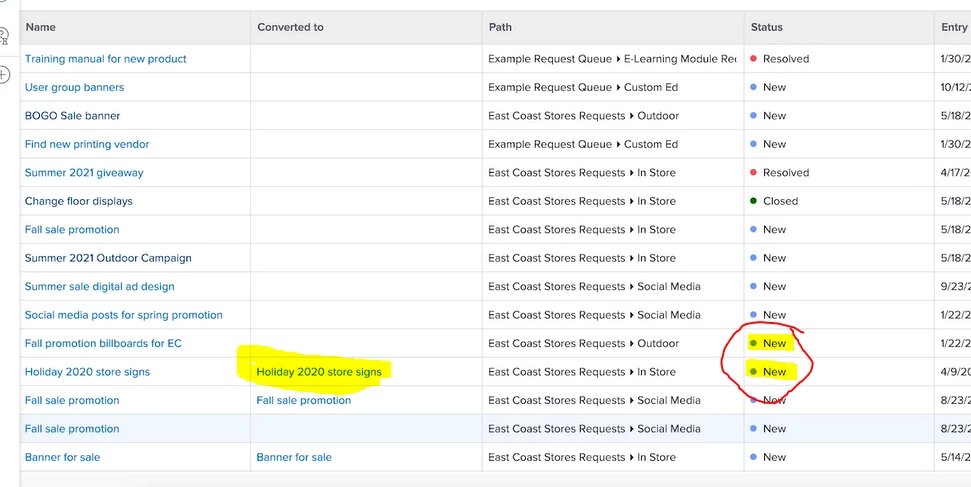 Summary: We direct people to the Requests page to ensure they can easily access the Projects from which their requests are derived. However, we see a status of "New" for every successfully converted project in Planning status, as well as for every request recently kicked off. It is confusing people and leading them to think the requests haven't been properly converted.
So my questions are several
1) Can we use Layout preferences to hide this Status column? That might reduce confusion and help us say "Use the Converted To column as your Bible." I can't find this in the Layout preferences section but I could be missing it.
2) Are there configurations we can make to have this column say "Closed" if the project has been successfully converted? To me, this "closes" the request, which is what this page should be showing.
3) If not, can this sheet show "Planning" if indeed that's what the status is?
The mix of request AND project data on this Requests sheet could definitely stand some fine-tuning, but unfortunately there seems to be no way to configure it in the meantime. Even the Training video (screenshot attached above) has this "New" discrepancy, unfortunately.
Thanks,
Ryan