Text Mode - Friendly URL displaying when URL hasn't been calculated yet
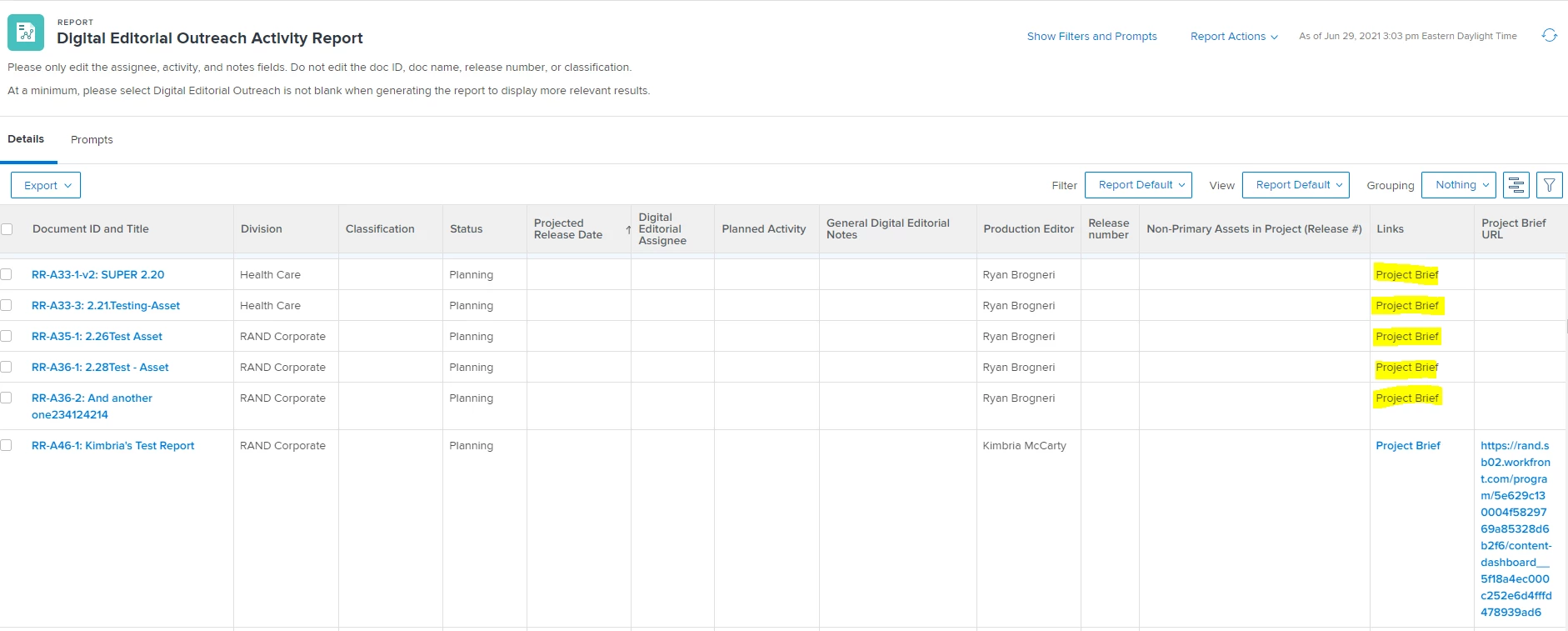
I am working to make a "Friendly URL" to a Program level Project Brief. I'm building the URL with a calculated field on the Project Brief custom form in the first place, that way I can get the URL to appear on the report when there IS a a Project Brief, and not appear when there isn't.
The problem is that my snippet below is showing plain Project Brief text when there isn't a Project Brief custom form. So something with my valueexpression is wrong, I just don't know what.
displayname=Links
link.url=DE:program:Project Brief URL
linkedname=program
namekey=view.relatedcolumn
namekeyargkey.0=program
namekeyargkey.1=Project Brief URL
querysort=DE:program:Project Brief URL
shortview=false
textmode=true
valueexpression=IF(ISBLANK({DE:program:Project Brief URL}),"","Click Here")
valuefield=program:Project Brief URL
valueformat=HTML
I'd like the yellow ones to just be blank because there isn't a URL (the column to the right is blank). The actually hyperlinked Project Brief is doing the right thing, because there is a URL.
Any ideas?