NicoleM1
Level 2
May 19, 2026
Solved

Text Mode Display Name Help

  • May 19, 2026
  • 2 replies
  • 34 views

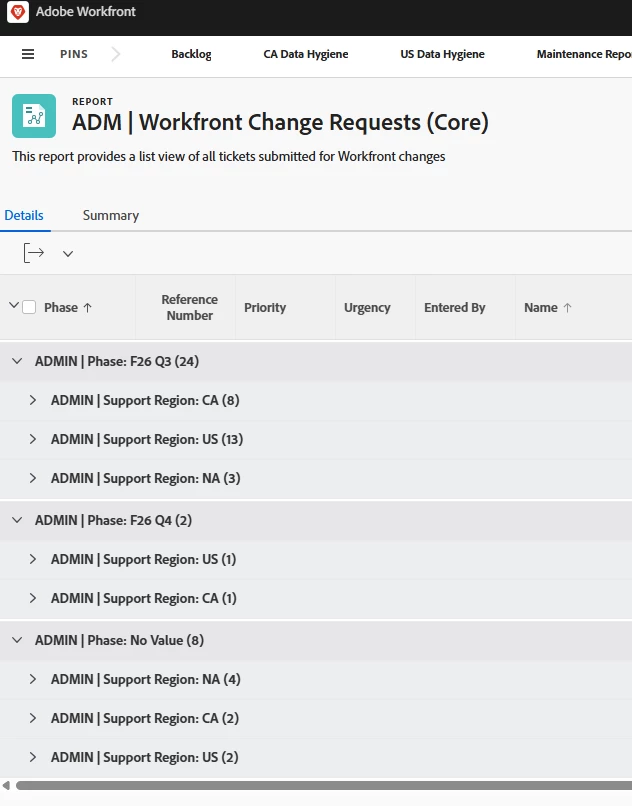
Hello! Still new to text mode so kinda feel dumb asking but here goes. 

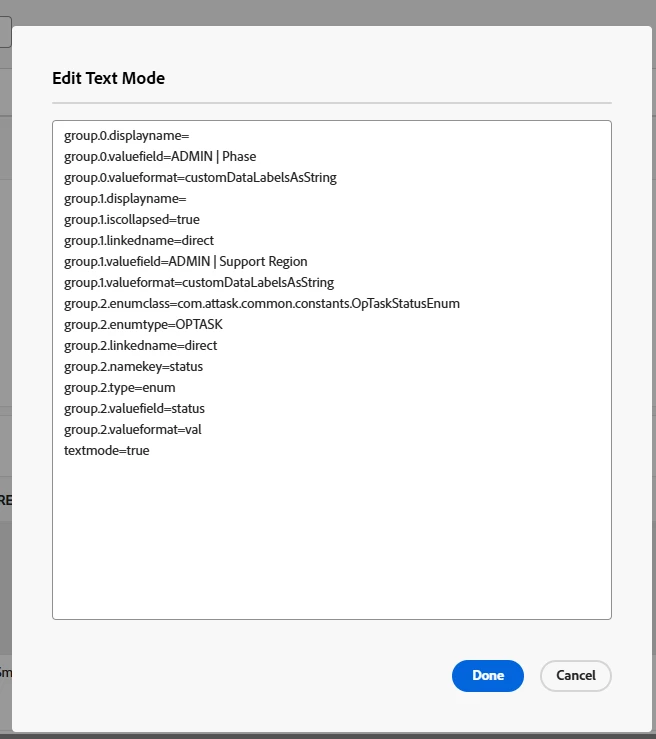
I don’t want my grouping to have display names. When I remove the displayname line completely, it defaults to be grouped by the field name. If I leave it blank at the end like - “group.0.displayname=” it’s still pulling the field name. According to the tip in this article (¾ way down the page), if I leave it “blank”, it should just be grouped by the value but it seems to not be working so I must be doing something wrong. Thanks in advance :) 
https://experienceleague.adobe.com/en/docs/workfront/using/reporting/reports/custom-view-samples/grouping-rename-grouping


Best answer by skyehansen

instead of the “group.0.displayname” line can you do “group.0.name=” and see how that turns out? (just try on the first grouping for now, without addressing the others)

2 replies

skyehansen
Community Advisor and Adobe Champion
skyehansenCommunity Advisor and Adobe ChampionAccepted solution
May 19, 2026

instead of the “group.0.displayname” line can you do “group.0.name=” and see how that turns out? (just try on the first grouping for now, without addressing the others)

NicoleM1
NicoleM1Author
Level 2
May 20, 2026

Thank you!! That worked!

Srinija_N
Level 7
May 20, 2026

Try replacing the ‘group.0.displayname=’ with ‘group.0.name=’ and leave it blank. This should work.

If this helped to solve your problem, please mark it as 'solved' so others can also find the solution faster. Thanks!
NicoleM1
NicoleM1Author
Level 2
May 20, 2026

Thank you, that worked!