Template Task Start Date dependant on Project Completion Date | Community
Skip to main content
May 11, 2023
Solved

Template Task Start Date dependant on Project Completion Date

  • May 11, 2023
  • 1 reply
  • 757 views

Hi.  I am trying to help a user set up a template and I am not sure how to accomplish what they need.


Schedule Mode = Completion Date


All tasks will work backwards from set Completion Date.  They would like to be able to set the Task Start Dates on the template to be X number of days from Completion Date.  So Task 1 needs to start 4 weeks prior to Completion Date, Task 2 needs to start 3 weeks from Completion Date, Task 3 needs to start 5 days prior to Completion Date etc...


Do I need to enter a formula to make this work?  Is there a simple solution I am overlooking?  Thank you!
This post is no longer active and is closed to new replies. Need help? Start a new post to ask your question.
Best answer by Sheri_Whitten

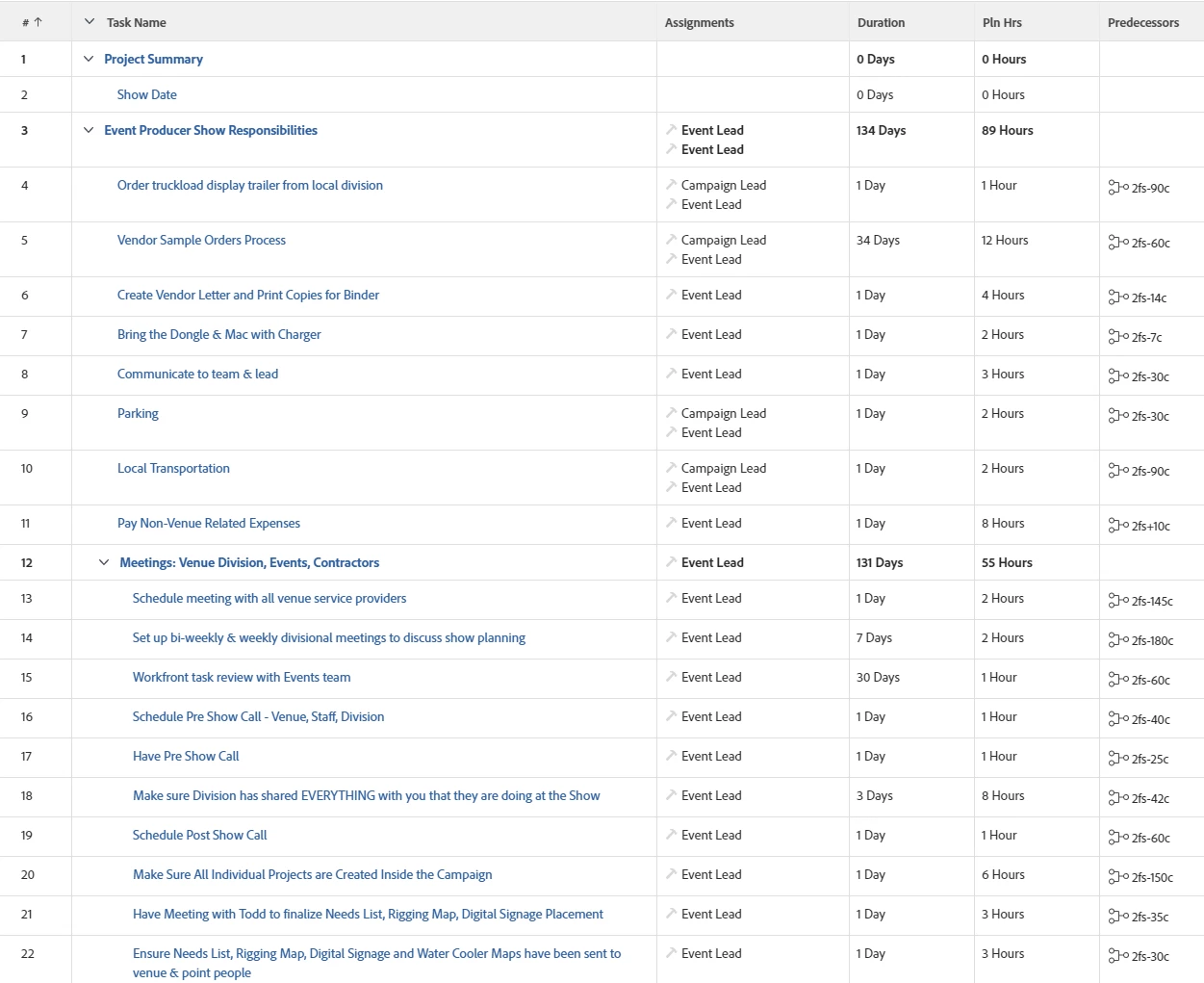
I remember our events team wanted this same thing and we were advised to have the first task in the template be the show date (or in your case the completion date), then use predecessors with lag, to work back from that date, to calculate the task dates (using Schedule Mode - Start Date). Here's an example:

This may be helpful: Overview of Lag Types 

I've never successfully used completion mode scheduling, it's always caused unintended consequences for us 😕😕

1 reply

Sheri_WhittenCommunity AdvisorAccepted solution
Community Advisor
May 16, 2023

I remember our events team wanted this same thing and we were advised to have the first task in the template be the show date (or in your case the completion date), then use predecessors with lag, to work back from that date, to calculate the task dates (using Schedule Mode - Start Date). Here's an example:

This may be helpful: Overview of Lag Types 

I've never successfully used completion mode scheduling, it's always caused unintended consequences for us 😕😕

CarlyHuAuthor
May 16, 2023

Thanks Sheri!  I am going to play with this idea and see if I can get it to work for them.  🙂