Targeted Auditing Proof Of Concept
This morning, I did a proof of concept of "Targeted Auditing" and would like to share it with the Community.
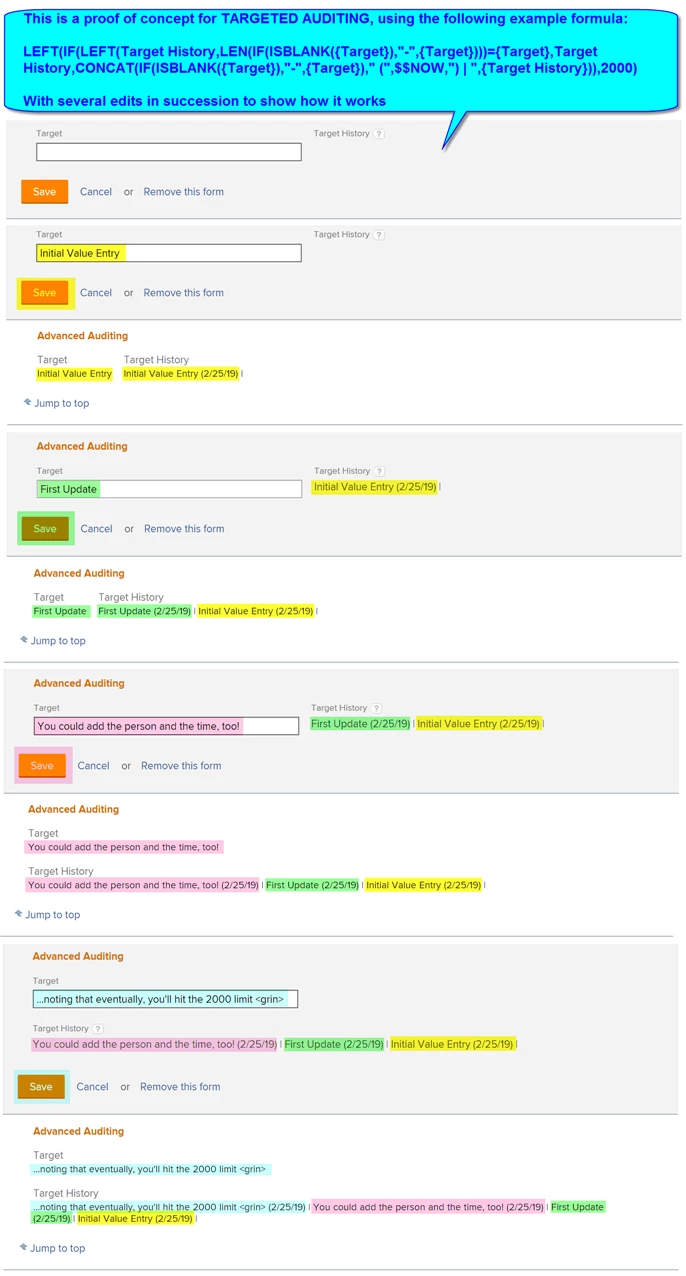
I thought of the idea years ago but never made time for until my unsatisfying response to this thread twigged my memory. As below, my example records the changes to a particular "Target" custom text parameter in its "Target History" custom calculated parameter counter part...and to my delight, actually works!
The formula turned out to be why-didn't-I-try-this-sooner? simple:
LEFT(IF(LEFT(Target History,LEN(IF(ISBLANK({Target}),"-",{Target})))={Target},Target History,CONCAT(IF(ISBLANK({Target}),"-",{Target})," (",$$NOW,") | ",{Target History})),2000)
And does the following:
- limits the Target History to the most recent 2000 characters (staying within the Workfront database limit)
- checks if the current Target value (treating it as "-" if it is blank) matches the front of the Target History value
- if they match, leaves the Target History "as is"
- if they don't match, replaces the Target History with the (latest) Target, followed by the current date, a vertical bar, and the previous Target History, which (similarly) preserves the previous value(s) and the time(s) entered
I've included a screenshot below so you can visualize how it works.
There are lots of other interesting bells and whistles you could add to what you capture (e.g. who, the time of day, etc.), so for those of you who find this of use and do make any cool enhancements, I encourage you to share them under this thread.
Have fun!
Regards,
Doug