Tableau Kanban | Community
Skip to main content
Level 2
April 12, 2023
Solved

Tableau Kanban

  • April 12, 2023
  • 1 reply
  • 905 views

Je n’arrive pas ajouter mes tâches dans un tableau Kanban. J’ai bien la possibilité.
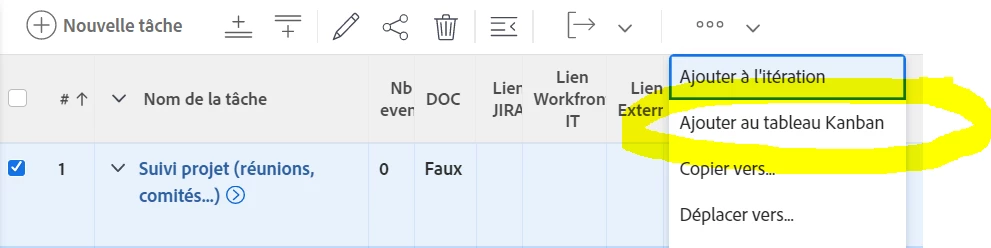


Mais ensuite, je n’ai pas la possibilité de sélectionner un Kanban.
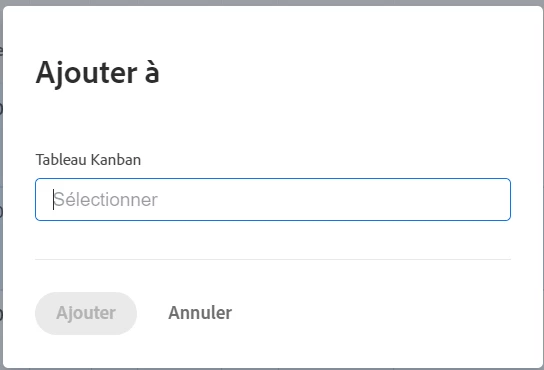


Et je n’ai pas non plus la possibilité d’en créer un. Ou alors je n’ai pas trouvé l’option qui me permettrait de le faire.


Merci d'avance pour votre aide.

This post is no longer active and is closed to new replies. Need help? Start a new post to ask your question.
Best answer by skyehansen

hi, I think you have to start by creating an agile team and configure it to Kanban. You'll then be able to add your items to the team's kanban board.


You can find instructions here:

https://experienceleague.adobe.com/docs/workfront/using/agile/agile-in-workfront/create-an-agile-team.html?lang=fr


Google translate: 

salut, je pense qu'il faut commencer par créer une équipe agile et la configurer en Kanban. Vous pourrez ensuite ajouter vos articles au tableau kanban de l'équipe.

Vous pouvez trouver des instructions ici :

https://experienceleague.adobe.com/docs/workfront/using/agile/agile-in-workfront/create-an-agile-team.html?lang=fr


1 reply

skyehansen
Community Advisor and Adobe Champion
skyehansenCommunity Advisor and Adobe ChampionAccepted solution
April 12, 2023

hi, I think you have to start by creating an agile team and configure it to Kanban. You'll then be able to add your items to the team's kanban board.


You can find instructions here:

https://experienceleague.adobe.com/docs/workfront/using/agile/agile-in-workfront/create-an-agile-team.html?lang=fr


Google translate: 

salut, je pense qu'il faut commencer par créer une équipe agile et la configurer en Kanban. Vous pourrez ensuite ajouter vos articles au tableau kanban de l'équipe.

Vous pouvez trouver des instructions ici :

https://experienceleague.adobe.com/docs/workfront/using/agile/agile-in-workfront/create-an-agile-team.html?lang=fr


GTN53Author
Level 2
April 12, 2023

Bonjour skyehansen,


Merci beaucoup pour votre réponse. Je vais tester cela dans notre environnement preview.

Bien cordialement,

Gilles TAUPIN

skyehansen
Community Advisor and Adobe Champion
April 12, 2023