
quarkmage
Level 3
May 1, 2026
Question

Summary Tab on Report - not exporting Sum data during export to excel

  • May 1, 2026
  • 3 replies
  • 47 views

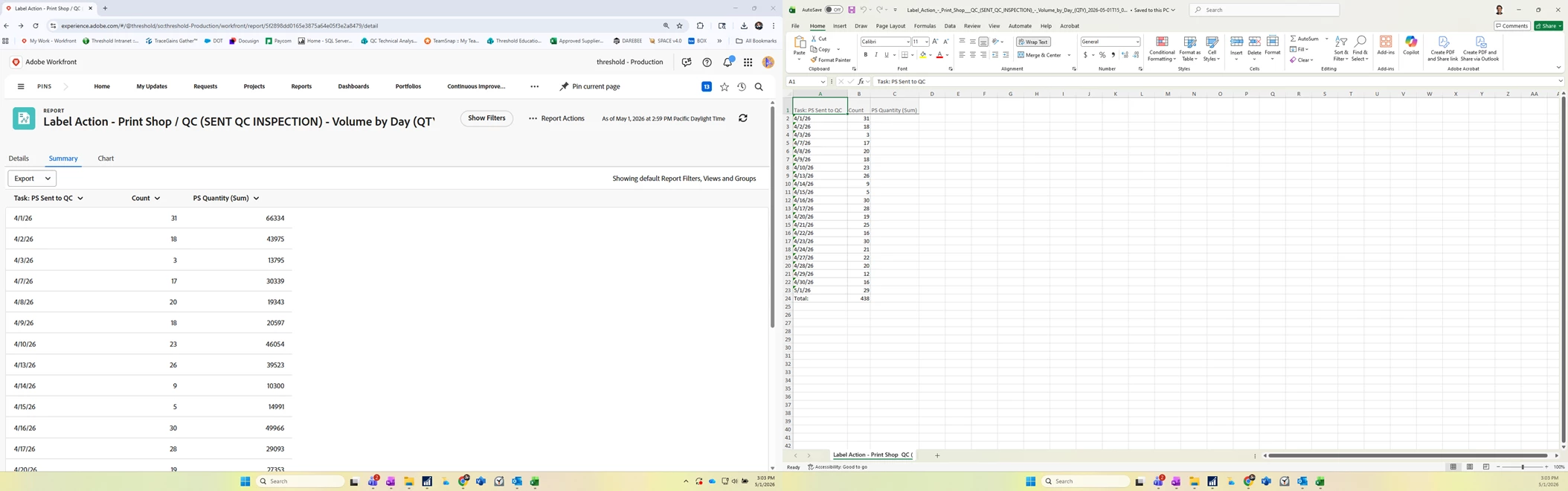
I have a report that totals the number of label jobs in a day, and each job has a quantity.
The results are grouped by day, so the summary tab has the date, count of jobs for each day, and a total sum of labels produced (custom field - number format).
the data displays properly on the summary tab, and the complete data shows up on a PDF export, but the Sum column has no data in the excel data exports.  if i export tab delimited to notebook, the totals are also there.  any help?  thank you.


3 replies

quarkmage
quarkmageAuthor
Level 3
May 1, 2026

Not totally sure, but also experiencing similar issues where the summary tab is reporting on custom field, where excel export does not seem to display the data.

skyehansen
Community Advisor and Adobe Champion
May 4, 2026

can you maybe convert your custom field column into text mode (in the view) and post it here, so we can see what format is exporting?


Occasionally the Support team has me change the valueformat, for example to “HTML” or “val” in order to get it to export. (obviously you can also submit a case to Support asking if there’s any way to get these exported values)

quarkmage
quarkmageAuthor
Level 3
May 4, 2026

Thank you ​@skyehansen for engaging.  Thought i would start with the experience league first.


Text Mode for the custom field, as accessed through the text mode in the report builder for this column.

aggregator.displayformat=customNumberAsStringaggregator.function=SUMaggregator.namekey=PS Quantityaggregator.valuefield=DE:PS Quantityaggregator.valueformat=customNumberAsDoubledisplayname=linkedname=directnamekey=PS Quantityquerysort=DE:PS Quantityvaluefield=PS Quantityvalueformat=customNumberAsString

Filter Rules for Report (not what you are asking for):
 

DE:PS Sent to QC=$$TODAY-1mDE:PS Sent to QC_Mod=betweenDE:PS Sent to QC_Range=$$TODAYprojectPortfolioID=63198ce50003632927868d003a73d014projectPortfolioID_Mod=in
skyehansen
Community Advisor and Adobe Champion
May 4, 2026

Does anything change when you change the “valueformat=customNumberAsDouble” line to something like valueformat=val or HTML? Just wondering. I’ll also take a look at it in my sandbox in case I can replicate it and start troubleshooting.

quarkmage
quarkmageAuthor
Level 3
May 6, 2026

Thanks ​@skyehansen 
This only started happening a few weeks ago and i have tried a few different reports that query number value custom fields and see similar lack of data when exporting the summary tab to excel , or excel(xlsx).  
I tried:
valueformat=val and got no change.  Sum column from summary report still blank for excel export.
I tried:
valueformat=HTML and got no change. 

Tab delimited and PDF reports show all the data, (with valueformat=val, HTML and original customNumberAsDouble).  this seems isolated to excel export for custom fields  again, used to work as expected until 3-4 weeks ago (approximate, i dont know exact day).

Thanks for looking into this.  i will likely log a help ticket by the end of the week if still unresolved.
thanks again for the support and the great contribution to this community.

skyehansen
Community Advisor and Adobe Champion
May 6, 2026

ah yeah, if it’s not working as expected and was working a month ago, you should log a case with Support. I think you’re probably experienced enough to know, but in case our other readers are not aware: it’s helpful if you have some old files to show them how it used to look.