Sorting of proof approvals from newest to oldest in Adobe Workfront Homepage | Community
Skip to main content
Level 1
March 31, 2026
Question

Sorting of proof approvals from newest to oldest in Adobe Workfront Homepage

  • March 31, 2026
  • 2 replies
  • 25 views

Hello, 


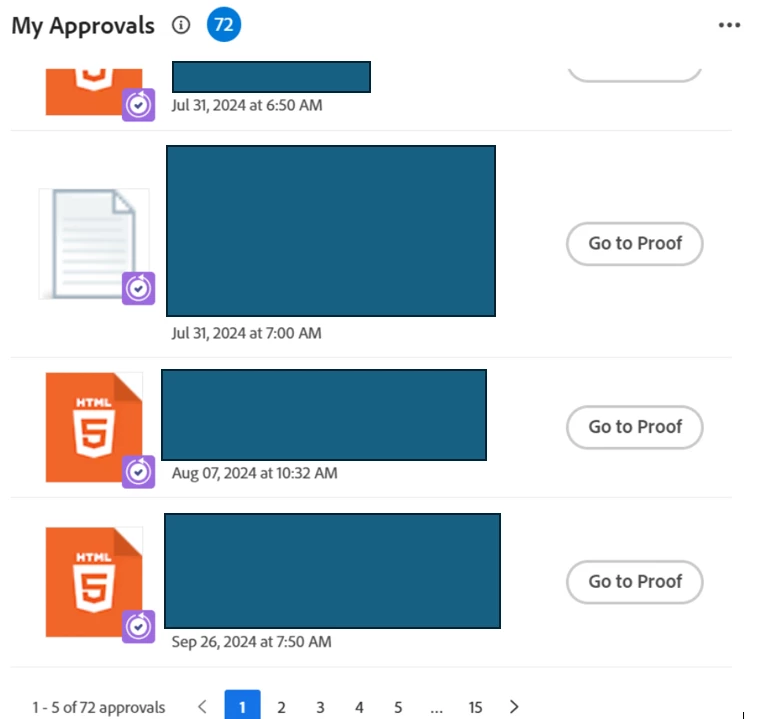
Is there a way to sort my proof approvals in my homepage from newest to oldest? Right now, when I login, the default is it shows the oldest ones first.


Thank you!
 

2 replies

AutumnE
Adobe Champion
Adobe Champion
March 31, 2026

Hi ​@IsaiahMa  


No. Workfront does not allow you to change the sort order of proof approvals on the Homepage. The Home widget is system‑controlled and defaults to showing the oldest items first.


Workarounds:

  • Navigate to Requests > My Requests > Proof Approvals (or the Proofing area) and use a list/table view, where you can sort by Created Date or Last Updated.
  • Bookmark that sorted view and use it as your daily starting point instead of the Home page.

Consider changing this to an “Idea” and ask your colleagues and Linkedin to “Upvote” the idea as an enhancement request in Exp League! The more users want that want this enhancement will push the Product Team to prioritize the request. 

Autumn Earle
skyehansen
Community Advisor and Adobe Champion
March 31, 2026

late breaking news from the product manager (jbarron):


“we are releasing this week in Preview (April 2) and Production (April 16) to allow users to change the sort order by oldest first or newest first, and it will persist for that user so we can make everyone happy 😀”

AutumnE
Adobe Champion
Adobe Champion
March 31, 2026

AMAZING! Thanks, Skye!

Autumn Earle
IsaiahMaAuthor
Level 1
April 1, 2026

Hello, thanks for sharing the info on the enhancement updates! ​@skyehansen  ​@AutumnE