Show name instead of code in Text Mode | Community
Skip to main content
October 17, 2024
Question

Show name instead of code in Text Mode

  • October 17, 2024
  • 1 reply
  • 630 views

Hi all, 


Im trying to customize a report and show a contractors name. When i add the column and select the custom field from our template in the project tab nothing displays. 


I switched to text mode after a search here, and came up with this; 


displayname=Contractor

linkedname=project
namekey=view.relatedcolumn
namekeyargkey.0=project
namekeyargkey.1=Contracted Contributor Details #1
querysort=DE:project:Contracted Contributor #1:name
textmode=true
valuefield=project:Contracted Contributor #1
valueformat=customDataLabelsAsString


However the result spits out a line of code instead of just the name of the contractor? 
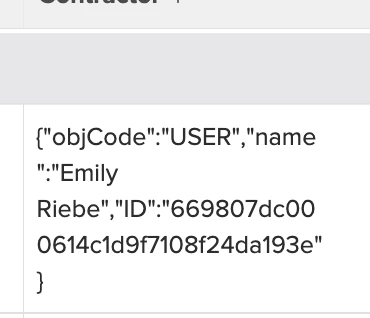
 

Any help to clean this up would be much appreciated! 

-Nat

This post is no longer active and is closed to new replies. Need help? Start a new post to ask your question.

1 reply

Sven-iX
Community Advisor
Community Advisor
October 17, 2024

Hey @nathanielse 


this line 

valuefield=project:Contracted Contributor #1


is your issue: a typeahead field contains that small JSON object you see printend.


To get the NAME, do similar to querysort line: 

valuefield=project:Contracted Contributor #1:name


If you get out of text mode, all typeaheads are listed as objects by field name and the selectable attributes are ID and name.