Set default view on the Tasks screen? | Community
Skip to main content
Level 2
December 2, 2021
Solved

Set default view on the Tasks screen?

  • December 2, 2021
  • 2 replies
  • 1275 views

Is there a way to make a specific View the Default on the Tasks screen? You can select many different views there and it will save the last view for the specific user, but I want to set a default for all users (which they can change later if they like).

This post is no longer active and is closed to new replies. Need help? Start a new post to ask your question.
Best answer by ChloeRo

Hi Tony!

Default views can be set through the layout templates. Here's how to do it:

-----------------------

  1. Go to Setup >> Interface >> Layout Templates
  2. Open the layout template that you want to adjust
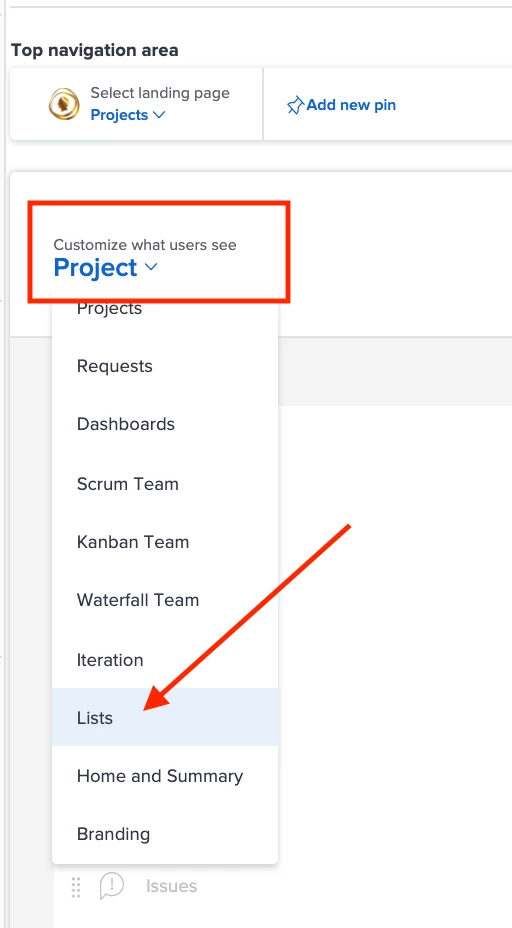
  3. Click on the dropdown for "Customize what users see" >> Select "Lists"
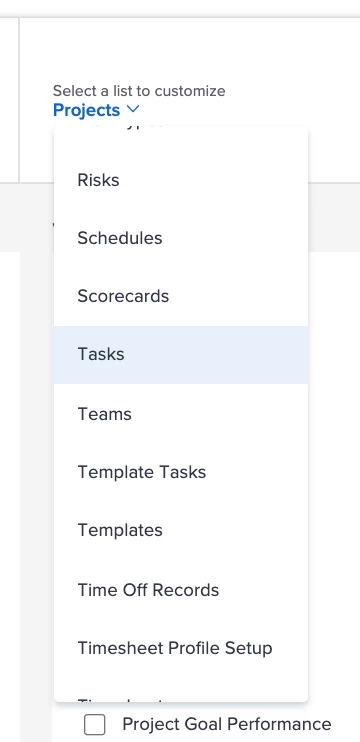
  4. On the right, click on the dropdown for "Select a list to customize" >> Select "Tasks"
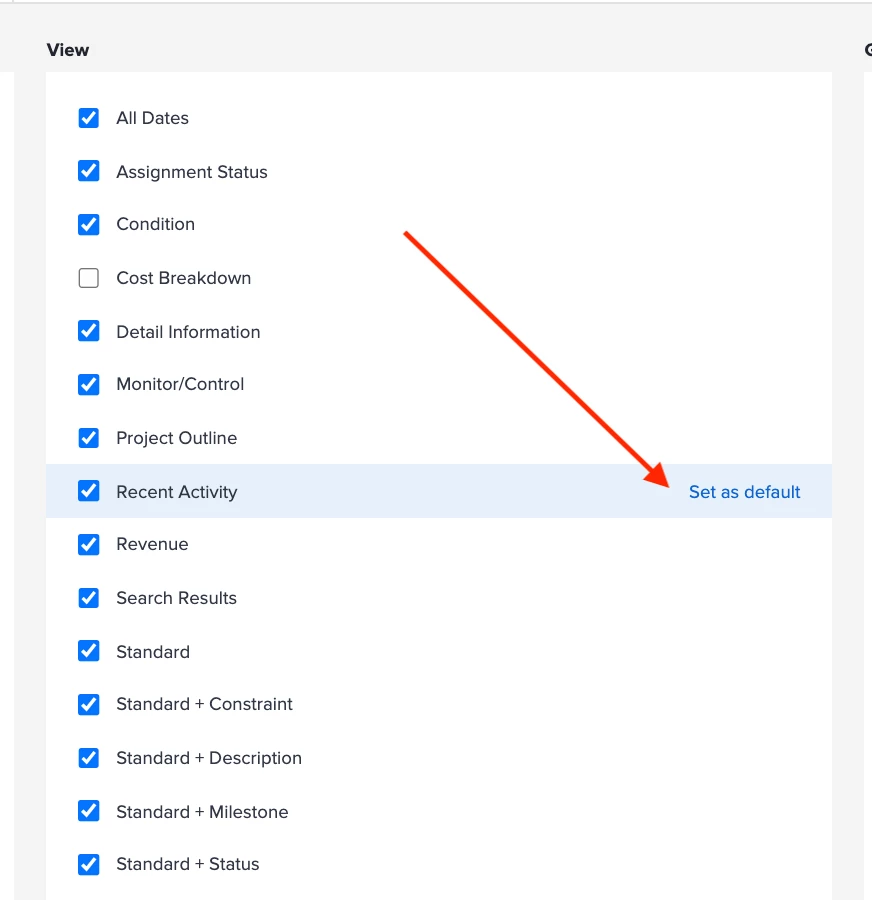
  5. Find the View that needs to be the default and click "Set as default"
  6. Repeat these steps on each layout template that needs to be updated.

-----------------------

So yes, it's definitely possible, just might be a little time consuming if you have a handful of layout templates.

2 replies

ChloeRoAccepted solution
Level 4
December 2, 2021

Hi Tony!

Default views can be set through the layout templates. Here's how to do it:

-----------------------

  1. Go to Setup >> Interface >> Layout Templates
  2. Open the layout template that you want to adjust
  3. Click on the dropdown for "Customize what users see" >> Select "Lists"
  4. On the right, click on the dropdown for "Select a list to customize" >> Select "Tasks"
  5. Find the View that needs to be the default and click "Set as default"
  6. Repeat these steps on each layout template that needs to be updated.

-----------------------

So yes, it's definitely possible, just might be a little time consuming if you have a handful of layout templates.

secinarotAuthor
Level 2
December 2, 2021

Thank you! That's exactly what I was looking for.

mattfuller1
Level 2
December 2, 2021

If I am understanding the ask, I don't know that it can be applied for all users, but you can set a default list view in the layout templates. So depending on how you are using those for your user base, you can set it there and it will apply to whoever is assigned the layout template. They can then change the view for themselves as they wish after that.

  1. Go to Setup
  2. Go to Interface > layout templates.
  3. Pick the layout template
  4. Choose Lists from the "Customize what users see" menu
  5. Choose Task from "Select a list to customize"
  6. Hover over the list of available views and there should be a "Set as default link"