Resource Planner URL Share | Community
Skip to main content
MarkTEvans
Level 3
July 8, 2026
Solved

Resource Planner URL Share

  • July 8, 2026
  • 4 replies
  • 114 views

I’m looking to utilize the Resource Planner Share Link to build a dashboard for Sr. Leadership to view resouces allocations across a Portfolio, broken out by sub groups with the Portfolio. 


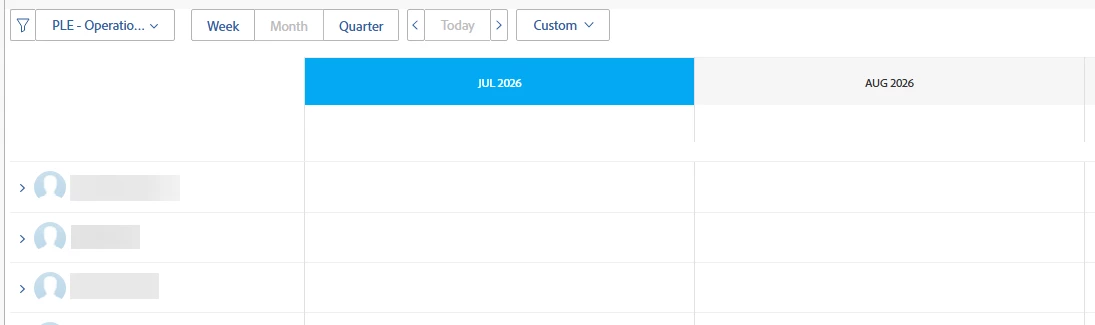
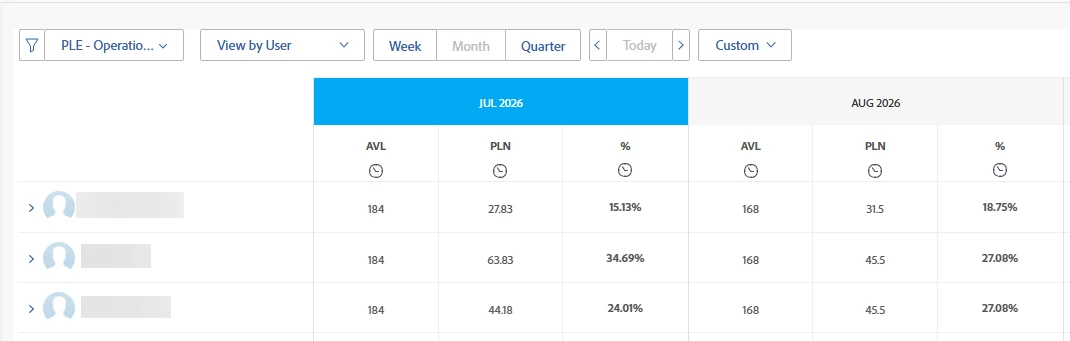
For this view, I’d like to utilize the Custom column formatting and only show Available/Planned/% of Hours. Everything looks great in the Resource Management area, but when I add the Share URL to a dashboard the data doesn’t show for the custom view. Is this a known issue? Is there a fix?

Resource Management Area:


Dashboard (via External Link):


Best answer by StutiTi

Hi ​@MarkTEvans , this is a known behavior that's being investigated, and it's worth understanding what's happening under the hood.

When a Resource Planner or Workload Balancer share link is embedded in a Classic dashboard as an External Page, the dashboard loads that URL inside an iframe. On Unified Shell environments, the share link redirects through Adobe authentication, and Adobe's auth domain blocks being embedded in an iframe for security reasons. The result is that the framed view either fails to load or renders without the data, even though the exact same view works perfectly when you open it directly in the Resource Management area.

A few things worth trying-

First, before opening the dashboard, make sure you're already signed into Workfront in the same browser session. If the iframe has to perform the Adobe sign-in step itself, it will fail in exactly this way. If you open the dashboard in a fresh session where auth hasn't happened yet, that can cause the blank data you're seeing.

Second, try regenerating the shareable link from the Resource Planner and swapping the new URL into the dashboard. There have been cases where regenerating the link resolved the embedding behavior.

Third, as a reliable workaround, the dashboard entry can still function as a clickable link that opens the Resource Planner view in a new tab rather than embedded in the frame. It's not as seamless for leadership as an embedded view, but it avoids the iframe auth block entirely.

If none of those resolve it, I'd echo Lyndsy and recommend logging it with Support, this specific issue is being actively looked at, so a case with your environment details will help.

4 replies

Lyndsy-Denk
Community Advisor
Community Advisor
July 9, 2026

Is the screenshot from the dashboard what you see or are you logged in as one of your stakeholders? If the latter, I’m thinking this is related to how much access your stakeholders have to the projects you’re crunching in Planner.

MarkTEvans
Level 3
July 9, 2026

Great question, that is what I see as SysAdmin.

Lyndsy-Denk
Community Advisor
Community Advisor
July 9, 2026

Hmm. Well, that’s not great. I would lob your question to support. Resource Planner is a relatively old tool, so I wonder if there’s some backend incompatibility with dashboards.

StutiTiAdobe SupportAccepted solution
Adobe Support
July 15, 2026

Hi ​@MarkTEvans , this is a known behavior that's being investigated, and it's worth understanding what's happening under the hood.

When a Resource Planner or Workload Balancer share link is embedded in a Classic dashboard as an External Page, the dashboard loads that URL inside an iframe. On Unified Shell environments, the share link redirects through Adobe authentication, and Adobe's auth domain blocks being embedded in an iframe for security reasons. The result is that the framed view either fails to load or renders without the data, even though the exact same view works perfectly when you open it directly in the Resource Management area.

A few things worth trying-

First, before opening the dashboard, make sure you're already signed into Workfront in the same browser session. If the iframe has to perform the Adobe sign-in step itself, it will fail in exactly this way. If you open the dashboard in a fresh session where auth hasn't happened yet, that can cause the blank data you're seeing.

Second, try regenerating the shareable link from the Resource Planner and swapping the new URL into the dashboard. There have been cases where regenerating the link resolved the embedding behavior.

Third, as a reliable workaround, the dashboard entry can still function as a clickable link that opens the Resource Planner view in a new tab rather than embedded in the frame. It's not as seamless for leadership as an embedded view, but it avoids the iframe auth block entirely.

If none of those resolve it, I'd echo Lyndsy and recommend logging it with Support, this specific issue is being actively looked at, so a case with your environment details will help.