Requests New Experience | Community
Skip to main content
Level 2
January 21, 2026
Solved

Requests New Experience

  • January 21, 2026
  • 2 replies
  • 66 views

Hello,

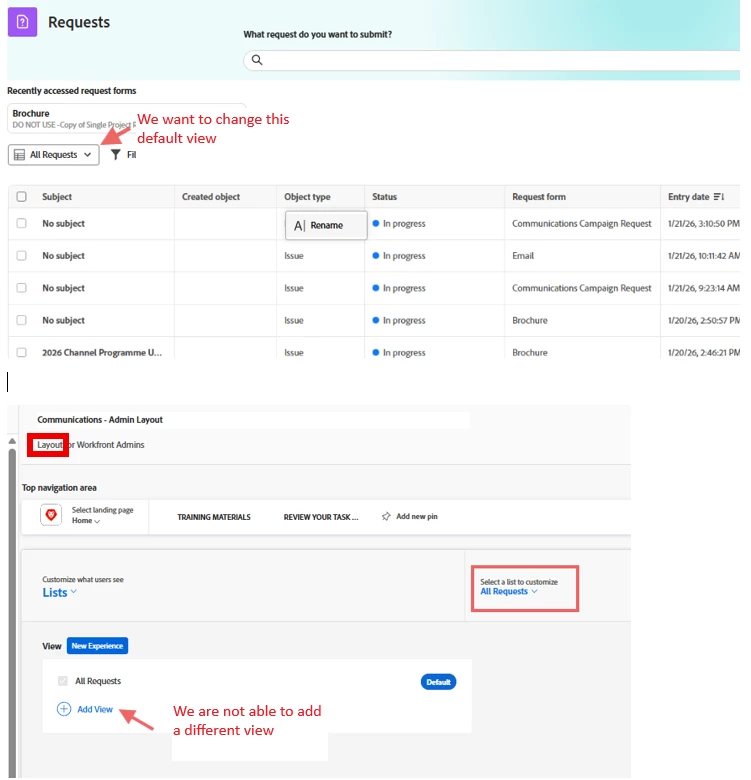
I am trying to change the All Request view in the New experience to a more suited view for our users and I don’t seem to be able to Add another view as a new default.

I have created a new Issues View and shared it system wide, and tried Adding it in the Users Layouts but none of the active views seem to appear when searching.

Is there a different way to change the default view?

Thanks!
 

Best answer by Madalyn_Destafney

Correct, custom fields aren’t available yet for the columns but I believe that’s the intention eventually (this whole overhaul of the request engine is an iterative thing). If you have some issue request forms that aren’t showing the subject field as they should I’d submit a ticket for Support to look into it.

2 replies

KellieGardner
Community Advisor
Community Advisor
January 22, 2026

To my knowledge, we aren’t able to customize the new request page through layout templates. I’m sure that will change eventually as the feedback is always given by admins that we want to set the preferences for our users.

Level 2
January 22, 2026

Thanks, Kellie

I did look for a way to provide feedback (as an Admin) but did not see it available (hence this posting). 

Would you advise to have a ticket submitted for this?  As you can see in my screenshot, the “subject” column displays no valuable information to our users.

Thanks!

MJ


Madalyn_Destafney
Community Advisor
Community Advisor
January 22, 2026

Hi there, you should be able to do this, it was part of Q1’s release last week. When you click the default view you should see +New at the bottom of the dropdown. It’s only after you create a view that you can add it as a default to a layout template. If you have rights to create views and are not seeing what is described here, please open a ticket with Support. 

If this helped you, please mark correct to help others : )
Level 2
January 23, 2026

Thank you, Madalyn

I see.  I was creating the View in the System Setup Interface.

I just created one using your article; however I don’t see native fields of interest (i.e. Reference Number) to add to my view. Are they not available yet?

Also, looking at my screenshot, do you have any idea why many show “No Subject” under the “Subject” column when there is a Subject/Name entered for the submitted Issue?

Thanks!

Madalyn_Destafney
Community Advisor
Madalyn_DestafneyCommunity AdvisorAccepted solution
Community Advisor
January 26, 2026

Correct, custom fields aren’t available yet for the columns but I believe that’s the intention eventually (this whole overhaul of the request engine is an iterative thing). If you have some issue request forms that aren’t showing the subject field as they should I’d submit a ticket for Support to look into it.

If this helped you, please mark correct to help others : )