Good day @workfrontwhiff
I don't know of a way to list queues a user has access to. Workfront does this with an API call for the currently Logged-in user. It's not so simple because in addition to manual Share-ing, group and company membership factor into whether you can see a queue or not.
I would start at the queues themselves: I think some of those are set to "anyone" when you may want to limit access by company or group.
The second radio option includes anyone who has inherited access to the queue, it, access to the portfolio/program where the queue is located AND any individual shares.
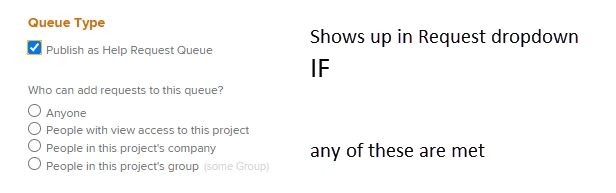
Once you've cleaned this up, check whether people are in the correct companies/groups.
Then review the manual Share settings.
Create a queue report to help:
- Filter: is Public - not equal - None
- Every project is a queue. This filters out projects where the "Publish as help queue" is unchecked
- Might want to add portfolio, program to see where the queue is located
- human readable column with access:
valueexpression=if({isPublic}=0, "Not a Request Queue", if({isPublic}=1, "Anyone in Workfront", if({isPublic}=2, "People with view access to this project", if({isPublic}=3, "People in this project's company", if({isPublic}=4, "People in this project's group", "")))))
textmode=true
displayname=Access
Hope that helps!