Report/Chart Grouping: Count Projects by Current Milestone - how to determine what Milestone a project is currently at?
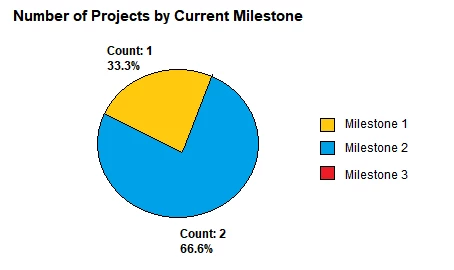
I have a report help request from an end user. They are trying to create a pie chart of # of projects grouped by current Milestone. Current Milestone = the earliest Milestone task in a Milestone path that's not yet at 100% complete.
Example: There are 3 milestones in a path for each project (milestone 1, milestone 2, milestone 3)
Project 1:
Milestone 1 = 50%
Milestone 2 = 0%
Milestone 3 = 0%
Project is a Milestone 1
Project 2:
Milestone 1 = 100%
Milestone 2 = 0%
Milestone 3 = 0%
Project is at Milestone 2
Project 3:
Milestone 1 = 100%
Milestone 2 = 50%
Milestone 3 = 0%
Project is at Milestone 2
Resulting pie chart:
Anyone know how to accomplish this? Do I start with a Project Report or Task Report? And how do I group and filter accordingly? The logic to determine which Milestone a project is currently at is what I'm struggling with.
Note: in this case, the Milestones are being treated more like gates/phases.
Thanks!