Report by document size | Adobe Higher Education
Skip to main content
Level 2
December 14, 2023
解決済み

Report by document size

  • December 14, 2023
  • 1 の返信
  • 637 ビュー

Hello WF Community! I am trying to remove large documents from our instance. I was attempting to create a document report showing me any files larger than 500 MB. Document Size Greater than 500M does not work. If I pull all the documents and sort by size, it works but the report is slow and churns as it is pulling in too many items. 

Thank you in advance

Andrea - Epsilon
このトピックへの返信は締め切られました。
ベストアンサー KellieGardner

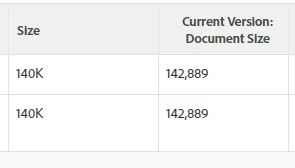
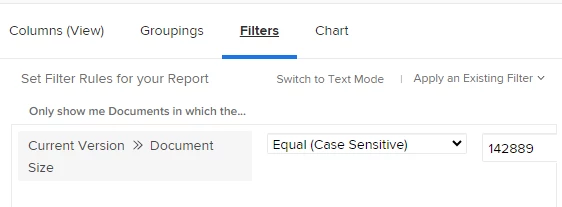
The filter needs to be in a number format vs the MB format. The size that shows by default is formatted to show you MB or KB but the actual value is stored as a regular number. 


example: If I put in my filter size=142889 it returns only two documents


1 の返信

KellieGardner
Community Advisor and Adobe Champion
December 14, 2023

The filter needs to be in a number format vs the MB format. The size that shows by default is formatted to show you MB or KB but the actual value is stored as a regular number. 


example: If I put in my filter size=142889 it returns only two documents


andreadmw作成者
Level 2
December 14, 2023

Yep! this worked. Thank you so much!