Remove Description field from cards? | Community
Skip to main content
Level 5
April 1, 2025
Solved

Remove Description field from cards?

  • April 1, 2025
  • 1 reply
  • 308 views

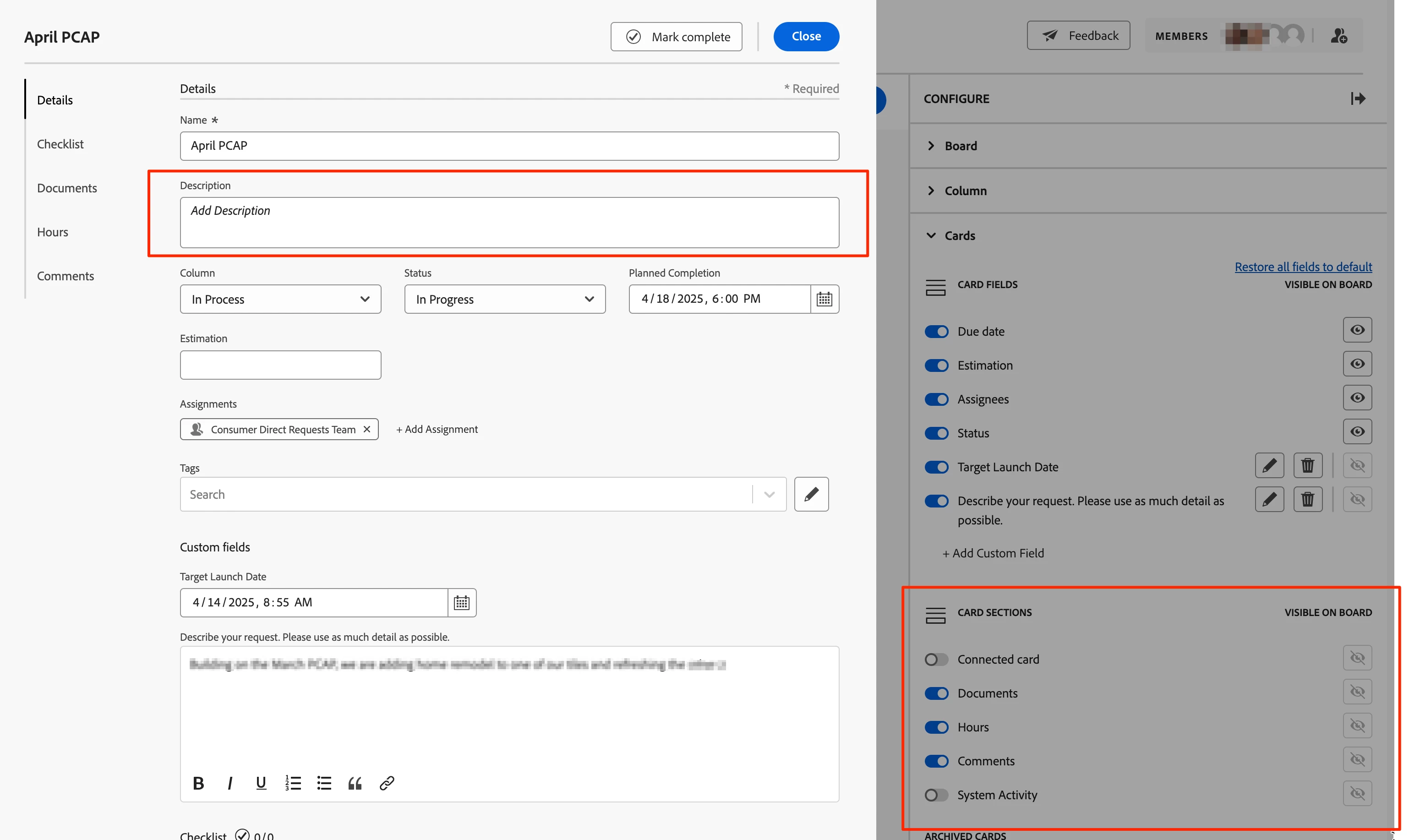
Is it possible to hide the Description field from cards? I'm not seeing it as an option in the "Card Sections" setting but wanted to make sure I'm not missing anything... We use a custom field to capture the description on the form because the system field is awkward being at the top of a form.


Thanks in advance!


This post is no longer active and is closed to new replies. Need help? Start a new post to ask your question.
Best answer by monicacardoso

Hi @kasey-gagne


Thank you for your question! Yes, that is correct; the system Description field currently isn’t configurable through the Card Sections settings in layout templates. It will always appear on the card by default, and unfortunately, there's no native way to hide it via the UI.


- Monica 

1 reply

monicacardosoAdobe EmployeeAccepted solution
Adobe Employee
April 10, 2025

Hi @kasey-gagne


Thank you for your question! Yes, that is correct; the system Description field currently isn’t configurable through the Card Sections settings in layout templates. It will always appear on the card by default, and unfortunately, there's no native way to hide it via the UI.


- Monica