Reduce result to single answer using collections | Community
Skip to main content
Level 4
June 19, 2026
Solved

Reduce result to single answer using collections

  • June 19, 2026
  • 3 replies
  • 90 views

Hi Community,

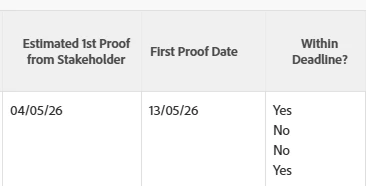
I know written something disgusting here, which is returning 4 answers. In this example, the project holds 4 documents, and I’m only interested in proofs that don’t contain the word “Quote”. Two documents are not proofs (so want to ignore these), and the two proofs contain four proof versions between them.

I’m not sure if I’m getting an answer per document. The actual answer I’m looking for with this example is “No”, as the first proof version was created after the estimate date. This proof doesn’t contain “Quote”. Screenshot, shows the results.

Code:

displayname=Within Deadline?
listdelimiter=<p>
listmethod=nested(documents).lists
type=iterate
valueexpression=IF(IF(!ISBLANK({ID})&&!CONTAINS("Quote",{name}),{project}.{DE:C+D Creative Deadline},"")<=(IF(!ISBLANK({ID})&&!CONTAINS("Quote",{name}),{entryDate},"")),"Yes","No")
valueformat=HTML

Results

If you’ve read this far, thanks for your time 😊

Matt

Best answer by skyehansen

@MattWindsor ok I think I understand a bit better what you are asking.


This line:

“But as it’s a collection, I think it has to output all results as that’s what it’s designed to do.”

Slightly not correct. The collection means it has to iterate (LOOK through all results), not that it has to OUTPUT all results. A common IF/THEN statement is “If it fulfills something, then output the result[, otherwise do nothing]” -- this is why the syntax stated in the adobe documentation is “IF(condition, trueExpression, falseExpression)”


This line:

“Would adding similar expression logic to the report filter reduce what the collection returned?”

No. Ultimately your project filter is designed to filter projects in or out. In a case where you have 4 docs, only ONE of which matches your criteria and the other 3 do not, the project would be filtered either in OR out based on what you chose to filter on. (“quote” in the filename would translate into “if a project has ANY file with “quote” in the name, leave it out” -- so even if it has another legitimate file, it would stay out)


Taking the valueexpression that we all have been focussing on:

IF(!ISBLANK({currentVersion}.{proofID})&&!CONTAINS("Quote",{name}),CONCAT({name}," - ",IF({project}.{DE:C+D Creative Deadline}>={entryDate},"Yes","No")),CONCAT({name}," - n/a"))
 

This is two merged IF statements. I tried to do a color formatting to help you see them, so hopefully the below works.  Black is 1 IF statement, and bolded red is the other one.

IF(!ISBLANK({currentVersion}.{proofID})&&!CONTAINS("Quote",{name}),CONCAT({name}," - ",IF({project}.{DE:C+D Creative Deadline}>={entryDate},"Yes","No")),CONCAT({name}," - n/a"))


Taking the “IF(condition, trueExpression, falseExpression)” syntax again to break down your statement:

first condition: if there is a proof ID and the name doesn’t contain quote;

first true expression: display the name (you can see this is where we are already in trouble -- we just told it to display the name no matter what else happens) and then do the second IF statement

first false expression: otherwise just display the name and then “n/a”

second condition: if the creative deadline is greater than the entry date; 

second true expression: then add a “yes”

second false expression: otherwise add a no.


Normally an IF statement is set up so it’s EASIER to exclude results (spoiler alert, yours is not and we’ll have to rebuild it). As an example, this one change would exclude anything that doesn’t have a proof generated.

IF(!ISBLANK({currentVersion}.{proofID})&&!CONTAINS("Quote",{name}),CONCAT({name}," - ",IF({project}.{DE:C+D Creative Deadline}>={entryDate},"Yes","No")),””)
 

As you can see, the “” thing I did at the end just excludes anything that didn’t fulfill your first condition. So now anything that isn’t a proof or has “Quote” in the name would get dropped.

I highly recommend you try this intermediate step just so you can see it at work, rather than scrolling down to try and find the answer to copy and paste.


I’m actually not going to parse the answer through AI -- I’m just going to guess it. The logic re-wording of your statement should be:

first condition: if there is a proof ID and the name doesn’t contain quote (didn’t change);

first true expression: do the second IF statement

first false expression: otherwise just display the name and then “n/a” (changed this to the “” and explained why above)

second condition: if the creative deadline is greater than the entry date; (no change here)

second true expression: display the name 

second false expression: otherwise do that “” thing again.


Do you want to take over from here and see if you can restructure the valueexpression I originally gave in order to get your desired result?
3 replies

Level 4
June 19, 2026

I’ve reworked my code but still get non-desirable results…


The top row “Test Upload 2” should be flagged with Yes and the other two not there but I think it maybe impossible to reduce the rows returned using a collection.


Here’s my field code…

displayname=Within Deadline? (Sample Project - &&)
listdelimiter=<p>
listmethod=nested(documents).lists
type=iterate
valueexpression=CONCAT({name}," - ",IF({DE:C+D Creative Deadline}>=(IF(!ISBLANK({currentVersion}.{proofID})&&!CONTAINS("Quote",{name}),{entryDate})),"Yes","No"))
valueformat=HTML
Level 4
June 19, 2026

Or if easier to read code


Level 4
June 19, 2026

Or this 🤣
 

displayname=Within Deadline? (Sample Project - &&)listdelimiter=<p>istmethod=nested(documents).liststype=iteratevalueexpression=CONCAT({name}," - “,IF({DE:C+D Creative Deadline}>=(IF(!ISBLANK({currentVersion}.{proofID})&&!CONTAINS("Quote",{name}),{entryDate})),"Yes","No"))valueformat=HTML
KellieGardner
Community Advisor and Adobe Champion
June 22, 2026

I would try adding in a filter for only those with a proof id. 


valueexpression=IF(!ISBLANK({currentVersion}.{proofID}),IF({DE:C+D Creative Deadline}>={currentVersion}.{entryDate},CONCAT({name}," - Yes"),CONCAT({name}," - No")),"")


Level 4
June 22, 2026

Hi Kelly, thanks for the suggestion 😊. As this is a project report, would I need to filter on a documents collection which would also have to incorporate my exiting project filters? Is that possible?
Thanks!

KellieGardner
Community Advisor and Adobe Champion
June 22, 2026

I mean adding in a filter on your valueexpression the way I posted it not on the report itself.

skyehansen
Community Advisor and Adobe Champion
June 22, 2026

I sent this through AI and then briefly tested it in my system and it seems to work as well as do what you wanted. The only caveat I can think to add is obviously we’re searching for “contains Quote” exactly as displayed. So it won’t react to quote or QUOTE or quoTE.


displayname=Within Deadline?
listdelimiter=<p>
listmethod=nested(documents).lists
type=iterate
valueexpression=IF(!ISBLANK({currentVersion}.{proofID})&&!CONTAINS("Quote",{name}),CONCAT({name}," - ",IF({project}.{DE:C+D Creative Deadline}>={entryDate},"Yes","No")),CONCAT({name}," - n/a"))
valueformat=HTML


Level 4
June 23, 2026

Hi Skye, I can get the separate elements to work e.g. a field with just the one proof date, but when I add the date calculation “=>”, I get multiple rows returns showing each proof / document within the project regardless of the desired filters (as per my screenshow).

I assume that didn’t happen to you? 


Thanks for your time 😊

skyehansen
Community Advisor and Adobe Champion
June 23, 2026

I’m not sure what you’re asking but here’s how I interpreted the valueexpression and this was the result I got over 4 files in my project.


  • project custom date field set to a date from last week
  • 2 files uploaded weeks ago, before the custom date
  • 2 files uploaded today, one with “quote” in the name and the other with a normal name

Right now the valueexpression is set to bring all 4 files in. THEN, based on whether the name contains quote, and how the creative deadline compares with the “entry date” of the document, it will respond with the name of the document and either yes, no, or N/A. I did get results that corresponded with my expectations based on what the valueexpression … expressed. So my two old files came in with yes, the new file upload came in with no, and the quote file came in with n/a.