


Question
Quick Tip: Save time by bulk assigning tasks
Have a new project you're spinning up where the same person/people will be doing many of the tasks? Save clicks and time with bulk assignments.
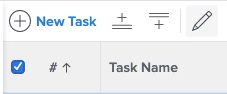
- Use the check box on the project level to select the tasks you want to bulk assign.
- Select the pencil tool that now appears.
- In the pop-up dialog box, scroll down to “assignments” and type the person you want to assign the tasks to.
- Save!
- When you go back to the project view, the task assignments will be updated.