Project Stuck at 90% Complete - All Tasks Complete | Community
Skip to main content
Level 1
July 16, 2026
Solved

Project Stuck at 90% Complete - All Tasks Complete

  • July 16, 2026
  • 5 replies
  • 164 views

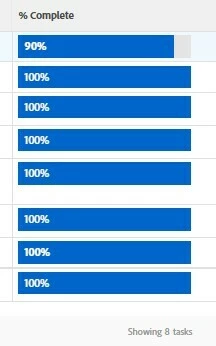
We have a project within WorkFront where all the subtasks under one of our task buckets are complete but the main task is stuck at 90% - which means we cannot “complete” the project. 


See attached image. 


Anyone know why this would occur or what the fix would be? 


Best answer by StutiTi

Hi ​@Einecolabitte , good suggestions already. The one cause not yet mentioned that's worth checking, the parent task's progress and duration settings. If the parent task or a subtask has a manual Percent Complete override, or a Duration Type that isn't set to calculate from children, the parent won't roll up to 100% even when all subtasks are done. Parent percent complete is also weighted by subtask duration, so an unusual duration value on one subtask can throw the rollup off.

Between that, checking for a pending approval or open issue on the completed tasks, and recalculating the project timeline, one of those should resolve it. If everything looks correct and it still sticks, it may be a one-off glitch on that project and worth a support case so Adobe can check the backend state.
5 replies

Lyndsy-Denk
Community Advisor
Community Advisor
July 16, 2026

I presume this is just a one-off just to keep you on your toes. What have you tried to force the parent to reach 100%? My first approach would be to manually recalculate the project timeline. Second, I would try to adjust the status in the parent task.

MoniqueEvans
Adobe Champion and Community Advisor
July 16, 2026

If these don’t work I would look to see if there’s an open issue on the task preventing it from closing

CelSal01
Level 2
July 16, 2026

This has happened to me. I add a new task and then delete that task and it will reset the % complete.

KellieGardner
Adobe Champion and Community Advisor
July 20, 2026

I would check to see if one of those 100% tasks has an approval on it that’s pending approval still. 

StutiTiAdobe SupportAccepted solution
Adobe Support
July 21, 2026

Hi ​@Einecolabitte , good suggestions already. The one cause not yet mentioned that's worth checking, the parent task's progress and duration settings. If the parent task or a subtask has a manual Percent Complete override, or a Duration Type that isn't set to calculate from children, the parent won't roll up to 100% even when all subtasks are done. Parent percent complete is also weighted by subtask duration, so an unusual duration value on one subtask can throw the rollup off.

Between that, checking for a pending approval or open issue on the completed tasks, and recalculating the project timeline, one of those should resolve it. If everything looks correct and it still sticks, it may be a one-off glitch on that project and worth a support case so Adobe can check the backend state.