Permissions via reporting | Community
Skip to main content
New Member
May 28, 2025
Solved

Permissions via reporting

  • May 28, 2025
  • 2 replies
  • 397 views

I wanted to check the permissions of all my portfolios but there is no native field for such column. The one field which is giving me some data is - "Category - shared with".


Is there anyone who has created such a report where one can see Portfolio name, Portfolio Manager, Group name and who all have access to the Portfolio (View/Manage)?
Best answer by Srinija_N

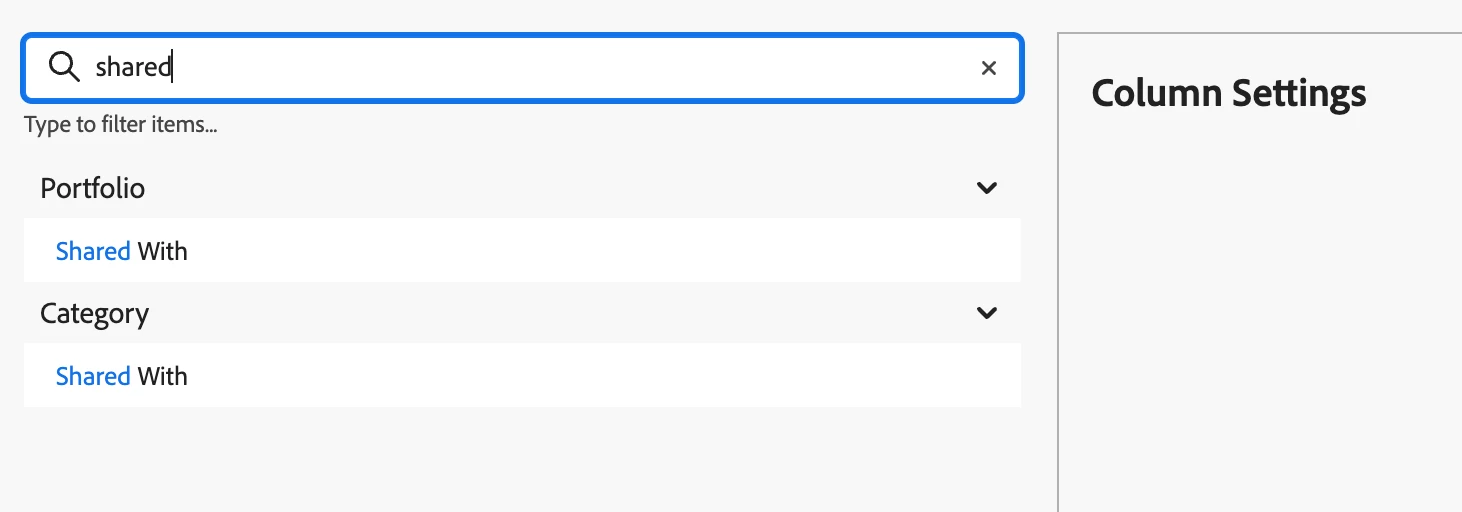
You should be able to see Portfolio:Shared with by using the search keyword "shared" as below.


Hope this is what you are trying to achieve, if not please clarify and provide more details on the need.


Please mark my response as "Correct reply" if this helped you and to help others.

Thanks in advance!

2 replies

skyehansen
Community Advisor and Adobe Champion
May 28, 2025

When I pull up a portfolio report I'm seeing the option for a column for "Portfolio | Sharing" -- can you clarify what more you would need other than this?

New Member
May 29, 2025

Hi @skyehansen when I am adding this column, I do not get it as an option.

What I really need is list of all my portfolios and who all have access to manage or view those portfolios.

Srinija_N
Srinija_NAccepted solution
Level 7
May 29, 2025

You should be able to see Portfolio:Shared with by using the search keyword "shared" as below.


Hope this is what you are trying to achieve, if not please clarify and provide more details on the need.


Please mark my response as "Correct reply" if this helped you and to help others.

Thanks in advance!

New Member
May 29, 2025

Thanks so much! This works 🙂