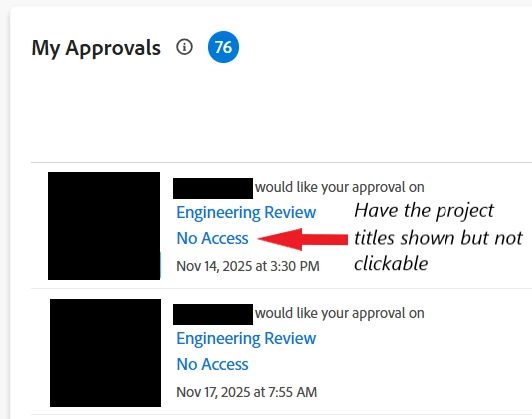
My Approvals - Visible Project Names
Description - Would like to have the project names visible (but not clickable) in the My Approvals widget when the approver doesn’t have access to the project instead of saying “No Access” where the project title is listed.
Why is this feature important to you - This would allow the approvers to know which project the approval is for. We work on parts and service content that needs to be reviewed by our service and engineering teams. Our project names are the parts or service section titles. Right now, we have to tag the approver in an update on the task telling them which parts and service content the approval is for. We use standardized tasks names on the project - Service Review, Engineering Review - so it can get confusing for the approvers to know which approval is for which project when they have 50+ approvals for tasks called Engineering Review. We don’t want to give approvers access to the full projects, so having the project name be visible would at least tell the approvers which approval is for which project.
How would you like the feature to work - Show the project name and have it be unclickable instead of “No Access” in the My Approvals widget when the approver doesn’t have access to the project.
Current Behavior: This does not exist.