
Merge two grouping in Task Report | Community
Skip to main content
Kundanism
Level 10
October 4, 2022
Solved

Merge two grouping in Task Report

  • October 4, 2022
  • 1 reply
  • 712 views

Hi,

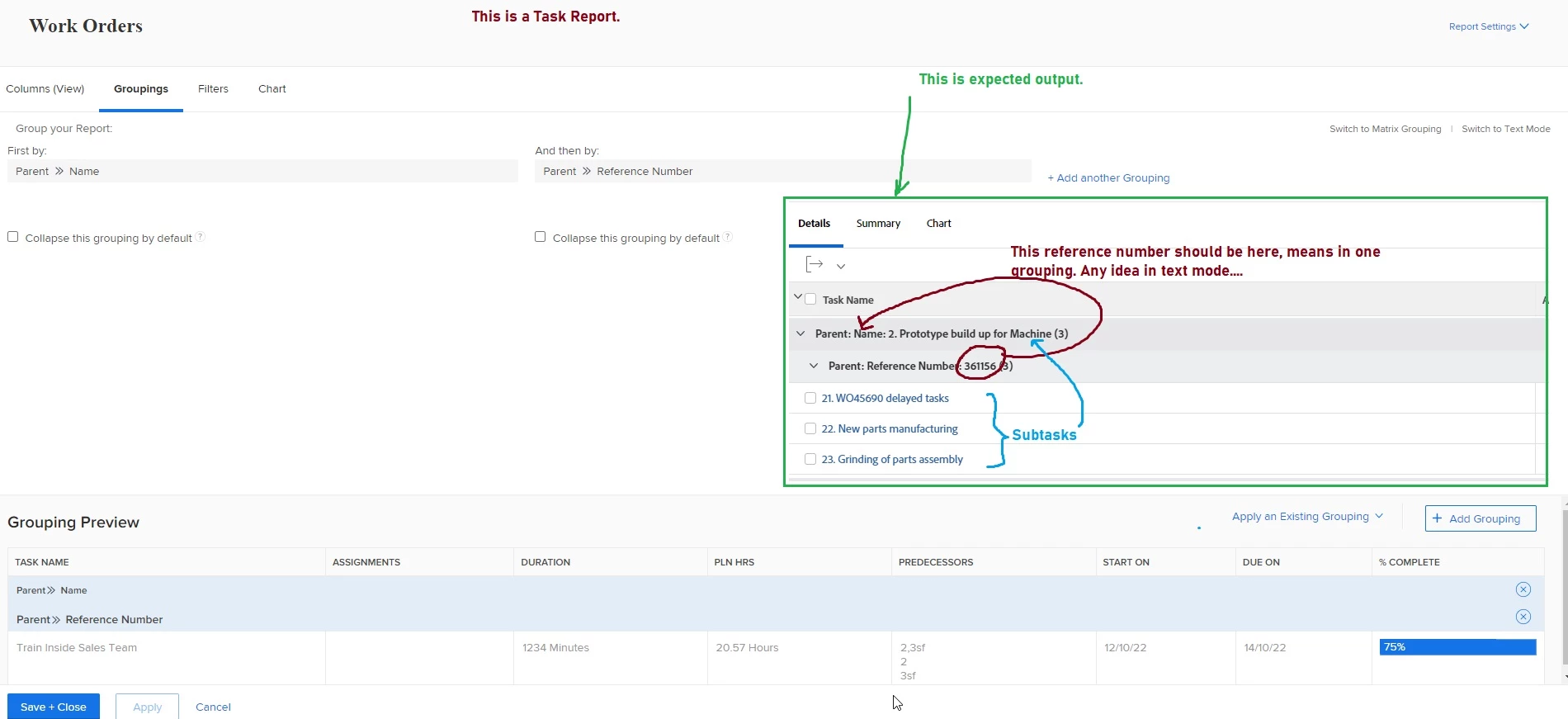
Any idea/ tip for text mode, how to merge two groups to visible in one. Created a task report and tried to do 

by using standard fields but no success.

Adding screen shot for reference. Please feel free to ask any other inputs.


Best regards,

Kundan.

This post is no longer active and is closed to new replies. Need help? Start a new post to ask your question.
Best answer by Richard_Le_

Hi Kundan,


Try the below text mode for your grouping.


group.0.linkedname=parent
group.0.namekey=view.relatedcolumn
group.0.namekeyargkey.0=parent
group.0.namekeyargkey.1=name
group.0.valueexpression=CONCAT({parent}.{referenceNumber}," - ",{parent}.{name})
group.0.valuefield=parent:name
group.0.valueformat=HTML
textmode=true

Best Regards,

Rich.

1 reply

Richard_Le_Community AdvisorAccepted solution
Community Advisor
October 4, 2022

Hi Kundan,


Try the below text mode for your grouping.


group.0.linkedname=parent
group.0.namekey=view.relatedcolumn
group.0.namekeyargkey.0=parent
group.0.namekeyargkey.1=name
group.0.valueexpression=CONCAT({parent}.{referenceNumber}," - ",{parent}.{name})
group.0.valuefield=parent:name
group.0.valueformat=HTML
textmode=true

Best Regards,

Rich.

Kundanism
KundanismAuthor
Level 10
October 4, 2022

Thanks a lot @richard_le_, genius . Just one more query, what to do if I want to filter both merged grouping with respect to planned completion date. Could you please recommed any tip or should need to update the above text mode? Please reply.


Have a nice day!


Mvh

Kundan.


Community Advisor
October 4, 2022

Hi Kundan,


No problem. I'm not sure I understand your question. A filter is independent of the grouping. Any filter applied to the planned completion date will not affect the parent task name or reference number.


Please clarify and I'll do my best to help.


Best Regards,

Rich.