Looking for help utilizing a custom field that doesn't need to be visible in the queue, but needs to be available on the back end | Community
Skip to main content
Level 2
September 24, 2025
Question

Looking for help utilizing a custom field that doesn't need to be visible in the queue, but needs to be available on the back end

  • September 24, 2025
  • 2 replies
  • 556 views

Hi everyone-


Scenario: We use Workfront's queue feature as our intake form to manage our incoming project requests. Users from outside our organization submit via the queue, and we then turn them into project plans. There are a few fields which are crucial to our project maintenance, but are not fields we wish for those filling out the form to dictate. One example would be a rich text field that we use for "status updates". I am an admin, so created an admin only section with these additional fields, but I am realizing that my users can't see the content of it, nor can they edit the fields. Typically, we go over our workload using the report, and along the way, we add notes into this status update field.


Has anyone found an easy way to integrate necessary custom fields without making them forward facing on the form that does not limit view and edit access to admins only? 
2 replies

Srinija_N
Level 7
September 25, 2025

yes, we created a section break which is only visible and editable to Admins while submission or post submission of the request.


HannahSc8Author
Level 2
September 29, 2025

Right, but what happens when you need non admin users to see and edit the results of these fields? 

KatherineLa
Community Advisor
Community Advisor
September 25, 2025

In that scenario, I create two forms and carefully manipulate the sharing settings so the external users can't see the second form. We've got a few queues that work that way in our instance. You can attach both to the queue default form setup at once, and as long as you share the forms correctly, the requestor will never see the second one but it will be usable normally once the ticket is submitted.

HannahSc8Author
Level 2
September 29, 2025

Can you share a little more on your configuration for this? I think I am doing similar, but people from within my team/org can't see or edit the results. It's a bit frustrating. Would love to see your setup! Thanks in advance 

KatherineLa
Community Advisor
Community Advisor
September 30, 2025

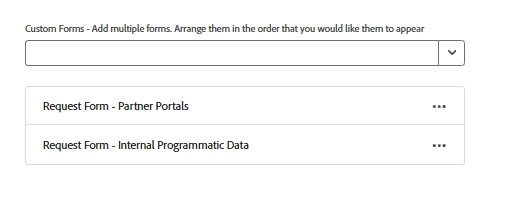
Sure thing, here's the general outline/setup. To start, this particular queue is one that external customer users log into in order to ask for various items. We needed a form for them to fill out, but also a form for the internal team to track updates and other details that didn't need to be customer-facing. So to start, we built two distinct forms, and attached both to the queue in the Queue Details section. 


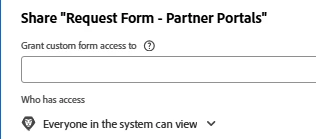
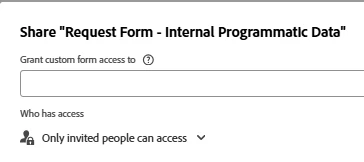
The first form is set with 'System-Wide' security like the second screenshot below. Then when we built the second form, I revoked 'Everyone in the system can view' and changed it to 'Only invited people can access'. That one is then shared to the internal team who manage this particular process. 


When the external customers log-in, they only see the first form. Technically they are both attached, the second is just invisible to them.


If your external folks are also in the habit of copying existing requests to make new ones, it will also work just fine. The form copies normally, it just remains invisible.  It WILL retain any data keyed into it though, so make sure your internal folks know to look at that when new things come in.