Limitations with 'public' view for Reports and Dashboards | Community
Skip to main content
Level 2
March 30, 2023
Solved

Limitations with 'public' view for Reports and Dashboards

  • March 30, 2023
  • 1 reply
  • 639 views

I know non-licensed people cannot use filters in public reports, but looking for more thorough understanding of public report limitations for non-users. It looks like they can still see groupings in the report, so wanted to confirm that also . Assuming licensed users will still receive the full experience when they click the public link.
Same with dashboards.
This post is no longer active and is closed to new replies. Need help? Start a new post to ask your question.
Best answer by Madalyn_Destafney

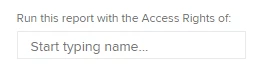
Hi, when sharing a report or dashboard with non-licensed users, for them to see the data, you need to ensure you have in your report settings an appropriate name in the 'run with access rights of' in the report settings (when in editing a report, go to report settings):


Typically an admin or someone with manage access to the content in your report(s) is listed here.
Reminder, if you have custom prompts applied, these will not show to the public/non-licensed user, and they cannot change any filters (groupings either I don't think unless they choose from native groupings), the reports will run as the report default view/filter/grouping.

Hope this helps! If so, please mark correct to help others : )


1 reply

Madalyn_Destafney
Community Advisor
Madalyn_DestafneyCommunity AdvisorAccepted solution
Community Advisor
March 31, 2023

Hi, when sharing a report or dashboard with non-licensed users, for them to see the data, you need to ensure you have in your report settings an appropriate name in the 'run with access rights of' in the report settings (when in editing a report, go to report settings):


Typically an admin or someone with manage access to the content in your report(s) is listed here.
Reminder, if you have custom prompts applied, these will not show to the public/non-licensed user, and they cannot change any filters (groupings either I don't think unless they choose from native groupings), the reports will run as the report default view/filter/grouping.

Hope this helps! If so, please mark correct to help others : )


If this helped you, please mark correct to help others : )