
Is there a way to fully display the Resolve Project Status (instead of the status abbreviation) in a combined column on an issue report? | Community
Skip to main content
SLuna74
Level 3
February 28, 2025
Question

Is there a way to fully display the Resolve Project Status (instead of the status abbreviation) in a combined column on an issue report?

  • February 28, 2025
  • 1 reply
  • 735 views

We'd like to combine two data elements in a single column, displaying the Resolve Project Status.  In a combined column, the project status is abbreviated.  Can we override the abbreviation? 
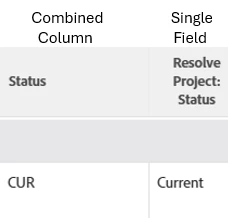


Combined column text:

column.6.displayname=Status

column.6.llinkedname=

column.6.makeFieldEditable=false

column.6.namekeyargkey.0=resolveProject

column.6.namekeyargkey.1=status

column.6.querysort=resolveProject

column.6.sharecol=true

column.6.textmode=true

column.6.valueexpression=IF({resolvingObjCode}="PROJ",{resolveProject}.{status},"")

column.6.valuefield=resolveProject:status

column.6.valueformat=HTML

column.7.Column=Preview

column.7.sharecol=true

column.7.textmode=true

column.7.value=<br>

column.7.valueformat=HTML

column.7.width=1

column.8.displayname=Status

column.8.llinkedname=

column.8.makeFieldEditable=false

column.8.namekeyargkey.0=resolveProject

column.8.namekeyargkey.1=status

column.8.querysort=resolveProject

column.8.textmode=true

column.8.valueexpression=IF({resolvingObjCode}="PROJ","",{status})

column.8.valuefield=name

column.8.valueformat=HTML

This post is no longer active and is closed to new replies. Need help? Start a new post to ask your question.

1 reply

_Manish_Singh
Level 9
March 3, 2025

Hello @sluna74 - I did not completely grasp the question, but if you are looking for the full status name, this might be helpful to you. I have modified few lines in column.6

column.6.displayname=Status
column.6.enumclass=com.attask.common.constants.ProjectStatusEnum
column.6.enumtype=PROJ
column.6.linkedname=resolveProject
column.6.makeFieldEditable=false
column.6.namekey=view.relatedcolumn
column.6.namekeyargkey.0=resolveProject
column.6.namekeyargkey.1=status
column.6.querysort=resolveProject:status
column.6.sharecol=true
column.6.textmode=true
column.6.type=enum
column.6.valueexpression=IF({resolvingObjCode}="PROJ",{resolveProject}.{status},"")
column.6.valueformat=HTML
column.7.Column=Preview
column.7.sharecol=true
column.7.textmode=true
column.7.value=<br>
column.7.valueformat=HTML
column.7.width=1
column.8.displayname=Status
column.8.llinkedname=
column.8.makeFieldEditable=false
column.8.namekeyargkey.0=resolveProject
column.8.namekeyargkey.1=status
column.8.querysort=resolveProject
column.8.textmode=true
column.8.valueexpression=IF({resolvingObjCode}="PROJ","",{status})
column.8.valuefield=name
column.8.valueformat=HTML

SLuna74
SLuna74Author
Level 3
March 3, 2025

Thank you so much, Manish!


Right now, the combined field shows the project status abbreviated (CUR instead of CURRENT).  We're simply wanting the full status name displayed and not the abbreviation.


I used the updated column 6 information and the column still abbreviates the status name.  I'm wondering if that's forced by the combined field functionality and not editable.


_Manish_Singh
Level 9
March 3, 2025

Hello @sluna74 - Are you trying to combine Resolve Project:Status and Project Status of the issue into a single column?

If so, I'm getting the full name directly without using text mode. Combining the last two columns would also provide the full name.