Is there a way for comments in proofs to be set not to collapse? | Community
Skip to main content
Level 4
June 19, 2020
Question

Is there a way for comments in proofs to be set not to collapse?

  • June 19, 2020
  • 2 replies
  • 457 views

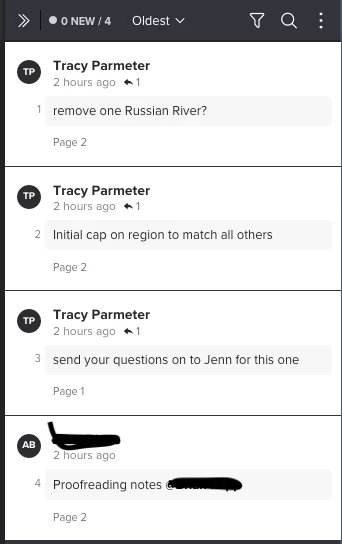
Our designers are often not noticing additional comments that are being made as replies in a Proof since the windows collapse until you click on them.

Is there a setting to make them stay opened?

See image attached. I see that there is a little arrow with a 1 on each indicating there is a reply but that is too easy to miss.
This post is no longer active and is closed to new replies. Need help? Start a new post to ask your question.

2 replies

Level 10
June 22, 2020

I am desperate for this, so many comments are missed because you have to watch for that tiny little arrow and click to open to see what happened. It's very difficult when there are a lot of comments.

imgrund
Adobe Employee
Adobe Employee
June 22, 2020

Hi - when they changed the viewer from Flash to HTML5, they did not bring the different comments views like All Open. (I do admit it has been a little annoying).

The compromise we came up with (which seems to be working) is that the Account person will put an action on everything (we have STET and To Do). The designer will then filter to only see the To Do's, but has to click on each comment to see the full thing. The good news is, once they open one comment, they just need to hit the down arrow on their keyboard to jump to the next one.

It isn't perfect, but so far seems to be working.