
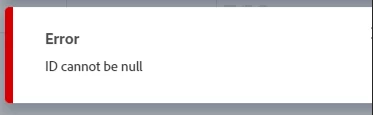
'ID cannot be null' error when copying a template | Community
Skip to main content
JJF72
Level 2
January 25, 2024
Question

'ID cannot be null' error when copying a template

  • January 25, 2024
  • 7 replies
  • 3070 views

We use Workfront templates regularly and will occassionally copy an existing template to create a new variant.  When we tried today, we all got the same message when trying to copy an existing template - ID cannot be null.  This is happening straight away.  Is anyone else experiencing this?  Is this a new issue in general or is it just us?  Just thought I would ask here before looking for support.
This post is no longer active and is closed to new replies. Need help? Start a new post to ask your question.

7 replies

_Manish_Singh
Level 9
January 25, 2024

I'm getting the same error:

KellieGardner
Community Advisor and Adobe Champion
January 25, 2024

Looks like a bug. I get the same error. 

January 25, 2024

Hi @kelliegardner, is this bug currently being fixed? Thanks!

January 26, 2024

I am also getting the same error.

Doug_Den_Hoed_AtAppStore
Community Advisor
Community Advisor
January 26, 2024


Hi @jjf72 (et al),


This is indeed a bug, and I invite you to include or link to the image below, which might help the dev team identify and resolve it more quickly.


Regards,

Doug


Susan_Hart_DeltaDental
Adobe Champion
Adobe Champion
January 26, 2024

I am also receiving this error and submitting a ticket to Workfront.

Level 2
January 26, 2024

I am also getting this error. YIKES

Level 4
January 26, 2024

Hi, 

I'm having the same issue and opened a ticket. 

Here is what I did as a work around in the interim.  I opened a new project using the template I want to copy. I then saved that task list as a new template and name it appropriately.  Then I deleted the project I had opened. 

Level 3
January 26, 2024

This work-around is exactly what I planned to do also.

January 26, 2024

Confirming we are having the same issue.