I have created 2 email templates for use in Workfront Timesheets and Requests but they do not seem to be working | Community
Skip to main content
Level 3
May 5, 2023
Solved

I have created 2 email templates for use in Workfront Timesheets and Requests but they do not seem to be working

  • May 5, 2023
  • 2 replies
  • 1432 views

I am trying to make the email template be used to send out the email when the actualCompletionDate for a request (issue) is created (The request has been completed).  I am getting the standard email that tells the requester that the request has been resolved.

Here is the setup I have completed
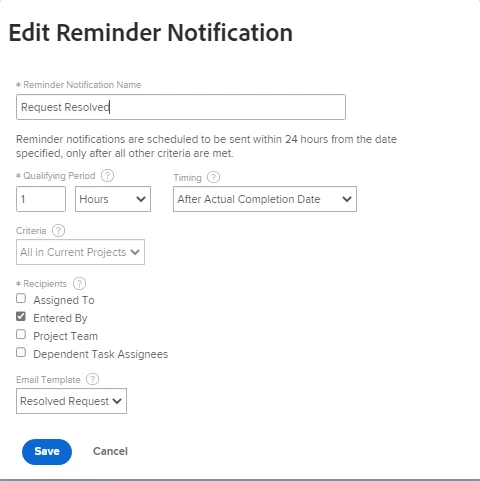
Here is the actual template that I created for the Request
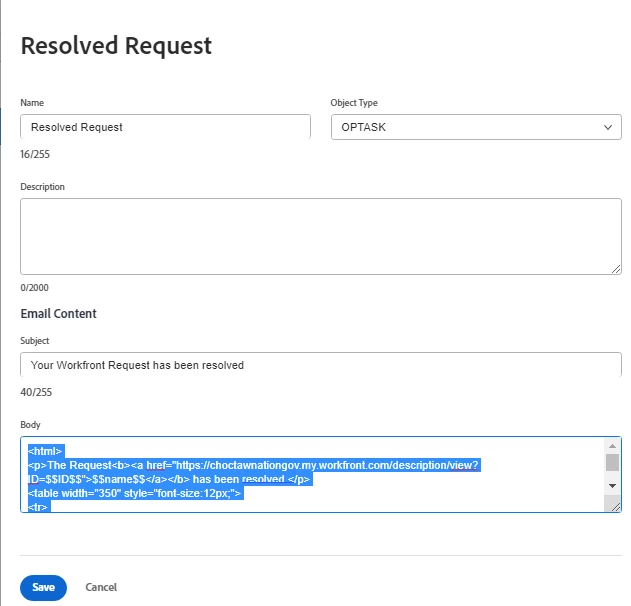
Below is the body from the setup


<html>
<p>The Request<b><a href="https://choctawnationgov.my.workfront.com/description/view?ID=$$ID$$">$$name$$</a></b> has been resolved.</p>
<table width="350" style="font-size:12px;">
<tr>
<td><b>Request Queue:</b></td>
<td>$$project:name$$</td>
</tr>
</tr>
<tr>
<td><b>Actual Completion Date:</b></td>
<td>$$actualCompletionDate$$</td>
</tr>
</html>

Any suggestions would be appreciated.


This post is no longer active and is closed to new replies. Need help? Start a new post to ask your question.
Best answer by Madalyn_Destafney

Yes, I have had other users try and they still only get the default notification


Yeah that's strange, I'd submit a ticket.

2 replies

Madalyn_Destafney
Community Advisor
Community Advisor
May 5, 2023

Hmm, based on your screenshots it looks like you've set them up correctly, you've created the template and associated it with the reminder notifications... Assuming you're sure you'd fall into the criteria to receive this custom notification, I'm wondering if it takes overnight to set. Did you create this before today?

If this helped you, please mark correct to help others : )
BillPeAuthor
Level 3
May 5, 2023

Madalyn,

I created it yesterday and waited to see if I got the email at midnight but I did not


Madalyn_Destafney
Community Advisor
Community Advisor
May 5, 2023

You may want to submit a Support ticket to have someone look into it if still not getting them today. Have you asked other users who would be getting this if they have received the custom one or are still receiving the default notification?

If this helped you, please mark correct to help others : )
BillPeAuthor
Level 3
May 8, 2023

Yes, I have had other users try and they still only get the default notification